Color temperature groups colors as warm or cool according to their visual and emotional qualities. Red, orange, and yellow are warm; green, blue, and purple are cool. Warm colors often feel energetic and prominent, while cool colors tend to feel calm and recessed. section 9.1.2
Treat temperature as a range rather than a strict split: warm colors can have cooler variations, cool colors can have warmer variations, and even gray can trend warm or cool. This makes subtle temperature shifts useful when refining an interface palette. section 9.1.2
Use temperature to support hierarchy and communicate interface tone:
- Place warm colors where attention matters, such as warnings, errors, declines, or notification badges. section 9.1.2
- Use cooler colors for calmer surfaces, recessed elements, or messages that should attract less attention. section 9.1.2
- Choose variations deliberately: green can suggest safety and relaxation, blue can suggest trust and tranquility, and yellow can signal caution while demanding attention. section 9.3
A button against a colored background
A red button on a blue background appears to sit forward. Swapping the colors makes the blue button feel more recessed, as though it sits inside a hole. The same effect can subtly influence prominence in a digital UI. section 9.1.2
Figure 9.4 The red button on the left visually appears more forward than the blue button on the right.
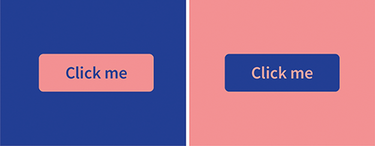
Compare the red and blue button treatments to see how temperature changes perceived visual depth and prominence. section 9.1.2
