A vector describes both distance and direction. In two-dimensional browser space, write it as [x, y]: [50, 20] means move 50px right and 20px down. Treat it as an arrow, an offset, or a precise movement instruction rather than a number with size alone. section 10.1 section 10.6
Browser coordinates start at the top-left: x grows rightward and y grows downward. Adding a vector to a point produces a new position, which makes vectors useful for dynamic placement, transforms, animations, and pointer-driven UI. section 10.1 section 10.0
Common vector operations turn movement goals into CSS positions:
- Add an offset to a mouse position to place a follower beside the pointer. section 10.3.2
- Subtract a current position from a target to obtain the direction toward that target. section 10.3.3
- Find magnitude to measure remaining distance, then normalize and multiply to move at a fixed speed. section 10.3.3 section 10.6
- Scale scroll movement into a smaller vector-like offset for parallax layers. section 10.2.4
Animate a dot toward a click
Store the dot position and click target as Vector2 values. Subtract position from target to get toTarget, measure its magnitude, then normalize and multiply it by SPEED. Add that step to position on each animation frame and apply the result with a CSS translate. When the remaining distance is smaller than SPEED, place the dot directly at the target. Subtracting 15 from each click coordinate centers a 30px dot on the pointer. section 10.3.3 section 10.5
Convert pointer direction into a rotary dial angle
Find the dial center from its bounding box, then calculate the vector from center to pointer as deltaX and deltaY. Pass those values to Math.atan2(), convert radians to degrees, and use the result in rotate() to turn the control. section 13.2.2
Figure 10.4 The dot follows the mouse with an offset of [10px, 10px].
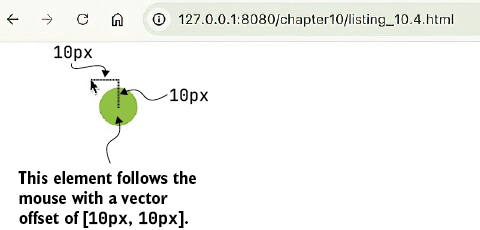
The figure makes the offset-vector result visible: the follower tracks the pointer while remaining 10px right and 10px down. section 10.3.2
