A comment is a user-authored response attached to a blog post or to another comment. Replies turn a post into a small discussion tree: the post is the root, and each comment can have children of its own. Registered users can add comments, while administrators can mark comments active or inactive. section 11.7 section 6.0
A comment resembles a content post in storage: both have an author, text, and creation and update timestamps. Comments lack titles and display as plain text rather than rendered Markdown. Keeping posts and comments in one self-referential Post table avoids separate tables for each reply level; a comment’s parent identifies what it answers. section 11.7
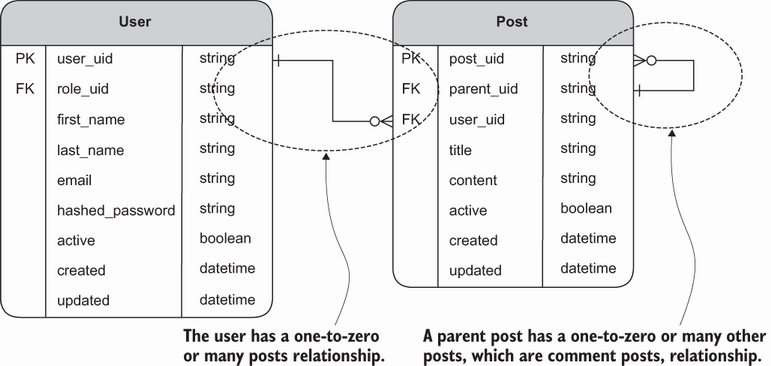
The self-referential Post-table diagram shows how content and its replies form a hierarchy without a separate table for every comment level. section 11.7
Creating and displaying a comment are two sides of the same parent-child relationship:
- Create: validate the submitted comment form, save a Post whose parent_uid points to the post or comment being answered, then redirect to the root post. section 11.8 section 11.8.3
- Retrieve: start at the root post and use a recursive common table expression to obtain its comment hierarchy. section 11.7.2
- Render: iterate through the returned comments, indenting replies by their place in the hierarchy. Bootstrap modals keep create and edit forms on the post page. section 11.7.3
A post with replies
One content post can have two direct comments. If the first has two replies and the second has one, all five comments still belong to the same discussion tree. The example interface limits nesting to two comment levels, but the self-referential storage design does not require a new table for each level. section 11.7

