liveBook · Manning

Commit

As explained in Building User-Friendly DSLs

A version-control record representing the state of tracked content at a particular point in time.

A commit records the state of code at a particular point in time and carries its own identity. In Git, that identity is a 40-character hexadecimal SHA hash. section 10.1

Use commits to support collaborative, distributed change workflows:

  • Branch from a mainline version. section 10.1
  • Record and share changes as a sequence of commits on a branch. section 10.1
  • Have the completed work reviewed, then merge it into the mainline. section 10.1

A commit sequence

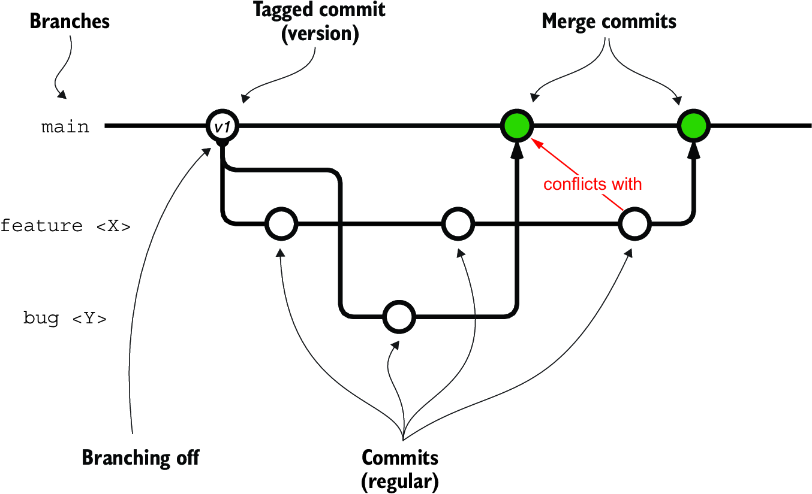
A feature branch can accumulate several commits while the mainline changes. Merging the sequence may produce merge conflicts when concurrent changes cannot be consolidated automatically, requiring manual resolution. section 10.1

Figure 10.2 The main concepts of a DVCS, and a typical interaction
figure

Visualizes commits, branches, tags, and their typical interactions in a distributed version-control workflow. section 10.1


How Building User-Friendly DSLs covers it

How deep it goes
Defines commit identity and workflow use, then describes accumulated changes and manual merge-conflict resolution.
Examples
Uses Git SHA hashes, feature-branch commit sequences, code review, mainline merges, and manually resolved conflicts.
What it assumes
Assumes collaborative codebase work and introduces distributed version-control concepts through commits, branches, and tags.
What you can do after
Operate Git-based collaborative workflows by recording changes, sharing commit sequences, reviewing work, and merging branches.
How it connects
Connects commits with distributed version control systems, Git, branches, tags, merging, and merge conflicts.

Also explained in

Compare how 5 books explain commit →

Related concepts

This explainer was generated by Manning's knowledge graph from the text of Building User-Friendly DSLs. The section links point to the parts of the book it draws on.


