A composite component organizes a complex React interface as cooperating subcomponents with a shared structure or behavior. It replaces a growing, feature-heavy component with a focused, modular structure that is easier to read and maintain. section 2.2 section 2.2.2
A radio group illustrates the progression:
- Begin with one component for direct, simple implementation. section 2.2
- As requirements grow, option objects and conditional features can make the component cumbersome and JavaScript-heavy. section 2.2.2
- Split the interface into smaller focused components, coordinating state, props, and context within the composite. section 2.2
Radio group with richer options
A radio group can receive options containing value, label, popularity, icon, postfix, and details fields. The group tracks the selected value, renders conditional decoration such as an icon or popular-option border, and reports changes through its callback. As this API expands, a composite structure keeps the root and its cooperating parts focused. section 2.2.2 section 2.2
Figure 2.5 A high-level overview of the Composite pattern. From the outside, the components are used as if namespaced by the root of the composite component (dashed arrows), but on the inside, they're regular components, communicating via one or more contexts (dotted arrows).
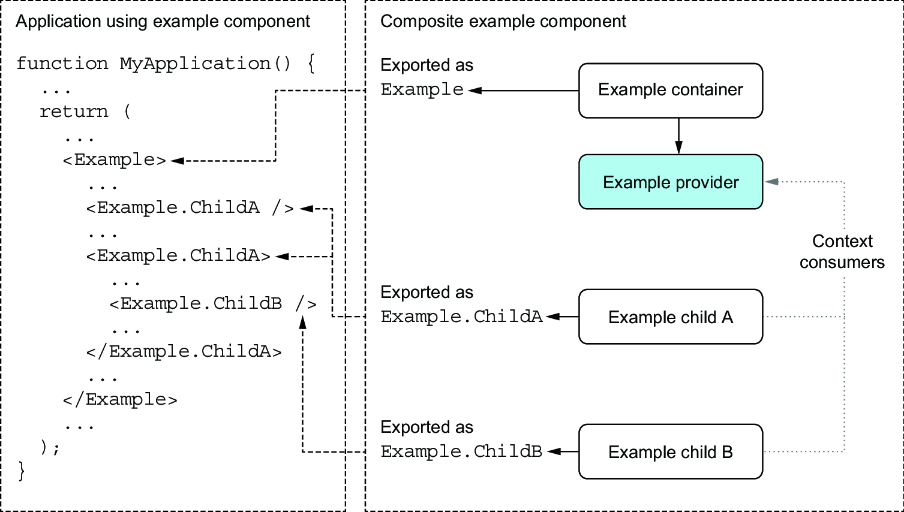
The pattern appears namespaced from the outside, while its internal components remain regular React components communicating through one or more contexts. section 2.2
