A composite tooltip presents several related values together. On a streamgraph, it follows the mouse and reveals the selected year plus sales for each music format, making stacked areas easier to read precisely. section 7.3.2
Build the tooltip progressively:
- Append a grouped SVG element with the class tooltip, then add a dashed vertical guide line. section 7.3.2
- Add a formatted year label and a text group positioned above the chart. section 7.3.2
- Create one text span for each format so every value has its own selectable class and line. section 7.3.2
- On mouse movement, read the pointer’s x-position, translate the tooltip, invert the x-scale, and update the year and values. section 7.3.2
Streamgraph sales breakdown
A streamgraph showing 40 years of music sales can use a composite tooltip to connect the hovered position with the corresponding year and sales breakdown. Matching the streamgraph’s stacking order to the tooltip labels helps users map visual layers to values. section 7.3.2
Figure 7.12 Streamgraph visualizing 40 years of music sales per format. The tooltip follows the mouse over the visualization, revealing the corresponding year and the breakdown of sales per format.
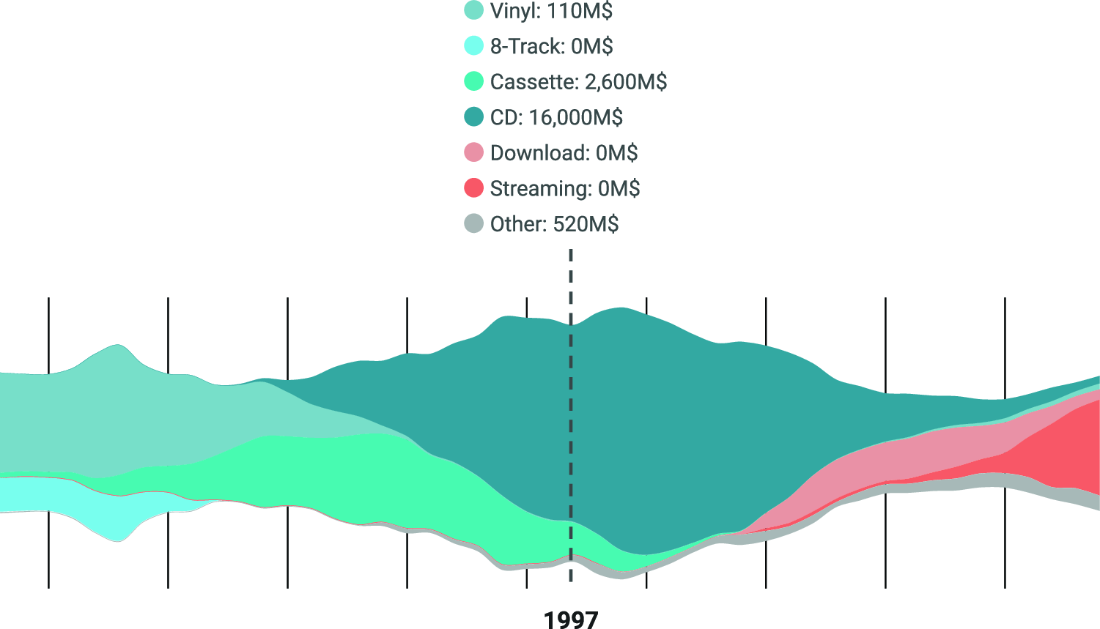
View the tooltip following the mouse over the streamgraph and revealing the year and format breakdown. section 7.3.2
