Composition is the deliberate arrangement of visual elements so a page or image feels balanced and directs attention well. Balance does not require perfect symmetry: shape size, line complexity, color, typography, and other details all affect visual weight. A strictly symmetrical result may be balanced but can feel inert. section 6.7.2 section 6.7.3
Use these practical checks when refining a layout or image:
- Divide the design into four quadrants and compare their visual weight. Consider both the size of shapes and the amount of detail or line complexity. section 6.7.2
- Also inspect diagonal divisions, then step back—or squint—to judge the overall relationship among areas rather than isolated details. section 6.7.2
- Crop deliberately instead of accepting the first result. Keep the subject visible, test alternatives, and avoid a merely symmetrical arrangement. section 6.7.3
- Place a key focal point near a rule-of-thirds intersection, then adjust the crop and aspect ratio until the image gives that point clear priority. section 6.8.2
Make a farmhouse the subject
Move a crop grid so its lower-right intersection sits on a farmhouse’s lightest area. Crop some sky and edge area, then compare shapes: the farmhouse becomes the first thing viewers see, while the valley provides secondary context. section 6.8.2
Composition remains a judgment call. Two crops can both work while emphasizing different things: a small shift in a portrait can move attention between eyes, reduce the subject’s dominance, and change the sense of depth. AI can compare versions, but choose according to what you want to emphasize. section 6.8.3
Figure 6.3 When an image is separated into a quadrant, you can more easily check the balance.
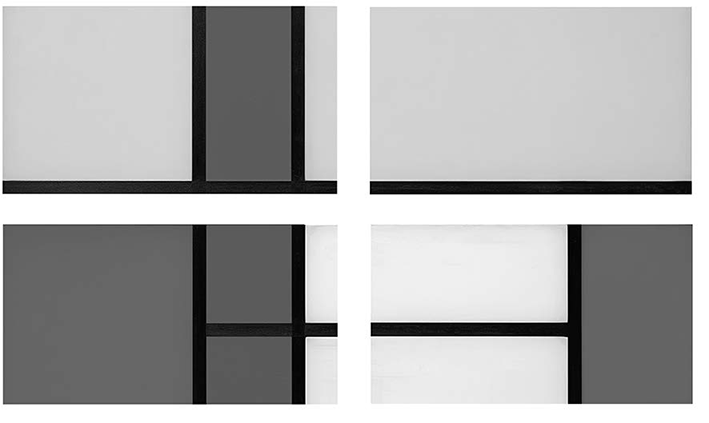
Use the quadrant overlay to compare visual weight across a design before changing its lines, shapes, or crop. section 6.7.2
