A container diagram is a C4 architecture diagram that zooms into a system to show its high-level applications and data services, their responsibilities, and their interactions. Here, “container” means an application or data service—not a Docker or Podman container. section 1.4.1
Use it when a system context diagram is too broad for developers working on a feature. The diagram exposes services such as frontends, backend applications, databases, session stores, event brokers, and other services, while keeping the view at an architectural level. section 1.4.1 section 1.5
MinSalus container view
A partial MinSalus diagram places the Patient Portal in front of a session store, Appointment and Patient Services alongside their databases, and a Notification Service connected through an event broker. These responsibilities and interactions provide a working map of the system before adding further services such as access control. section 1.4.1
Figure 1.7 The container diagram for MinSalus, following the C4 model.
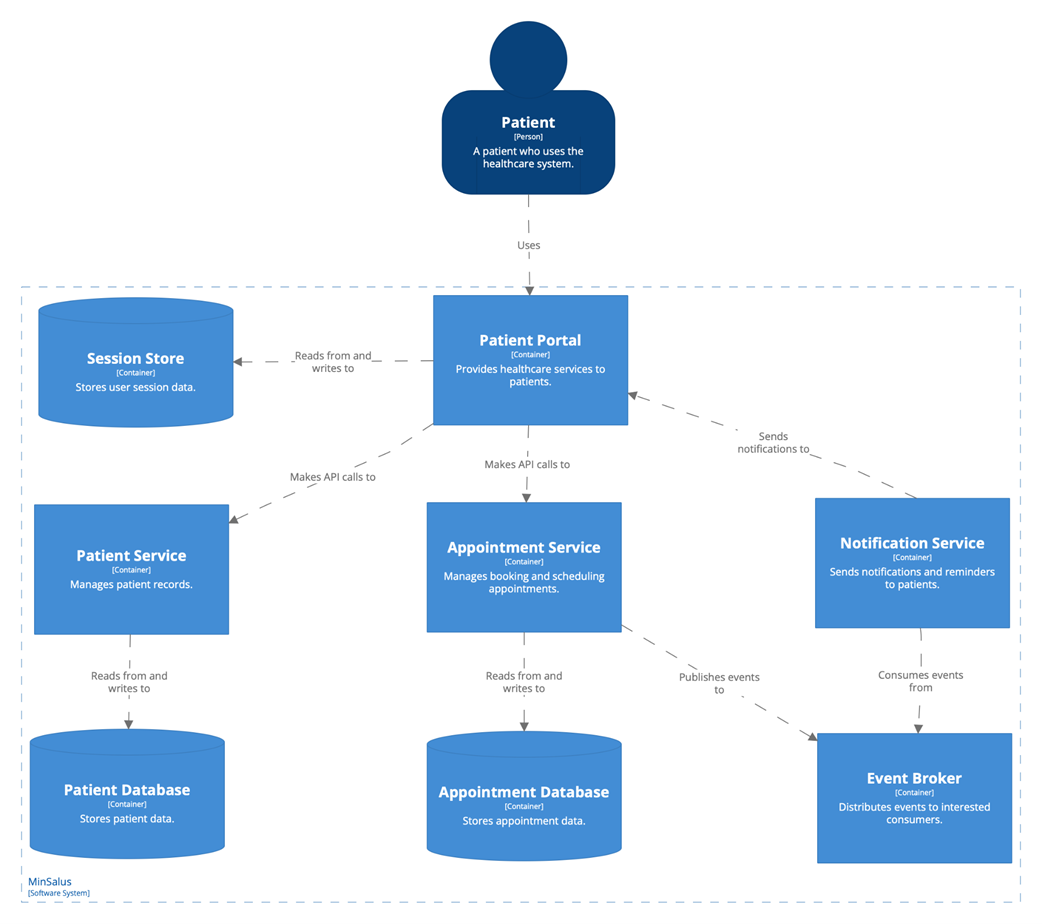
Use the C4 container diagram to inspect the MinSalus system’s applications, data services, responsibilities, and interactions. section 1.4.1
