A container filesystem is the virtual disk visible inside a container. Docker builds it from image layers and one writable layer, so applications work with ordinary files and directories. Changes made in the writable layer affect only that container; they do not modify the image or other containers. section 6.1 section 6.5
Choose the storage source according to how long the data must live:
- Use the writable layer for transient data such as a local cache. Removing the container removes this layer and its data. section 6.1 section 6.5
- Use Docker volumes or mounts when data must survive container replacement; these sources have a separate lifecycle from containers. section 6.1
- Use local bind mounts to share host files with a container, including source code that should update immediately after local edits. section 6.5
- Treat distributed bind mounts as slower and potentially less feature-complete than local disk; use them for configuration, shared caches, or data storage. section 6.5
See container data disappear
Create a container, copy a file into its filesystem, and run it again to observe the modified state. Start another container from the same image: it sees the original image content. Remove the first container, and its changed file is gone with the writable layer.
Figure 6.15 The container filesystem is created from the union of multiple sources.
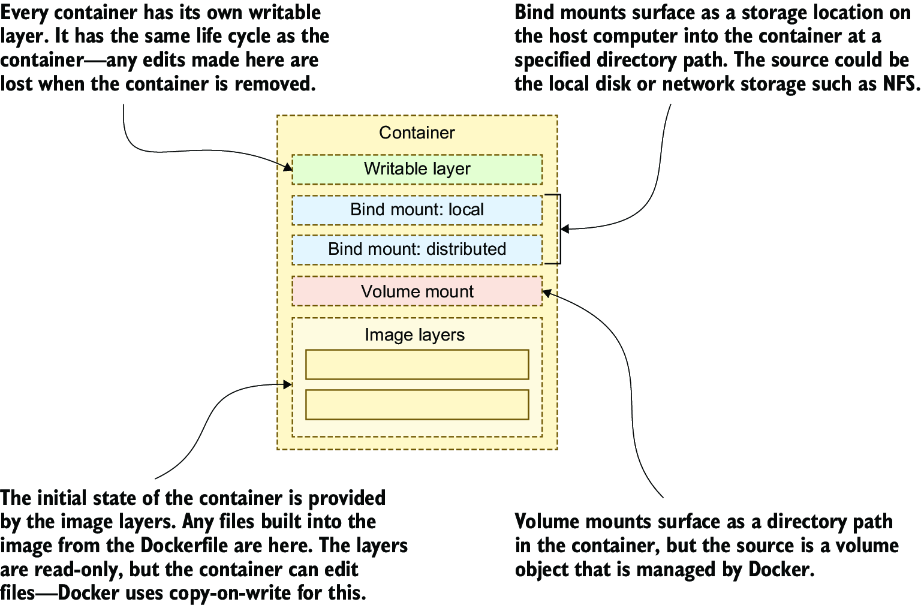
Inspect how image layers, mounts, and the writable layer are combined into the single filesystem visible inside a container. section 6.5
