Container orchestration automates how containerized applications are built, configured, run, and eventually kept healthy across computing resources. It becomes useful when running several containers, handling upgrades, responding to additional traffic, and allocating resources efficiently exceeds what manual commands can manage. section 1.2 section 6.2
A practical deployment path increases automation as the workload grows:
- Use Docker commands to build and run one container with ports, environment variables, and volumes. section 6.0 section 6.2
- Move repeated runtime parameters into compose.yaml, allowing Docker Compose to build, run, and stop containers consistently. section 6.0 section 6.2
- Progress to Kubernetes when multiple containers, upgrades, traffic, and resource allocation make simpler container-based deployments unsustainable. section 1.2
Replacing a command nightmare
Running separate Docker commands for multiple projects requires remembering each volume, environment variable, port, and image. Docker Compose records those options in YAML and runs the containers with one simpler workflow; Kubernetes becomes the next step when this approach no longer handles operational demands efficiently. section 6.0 section 1.2
Figure 1.2 Code path to Kubernetes
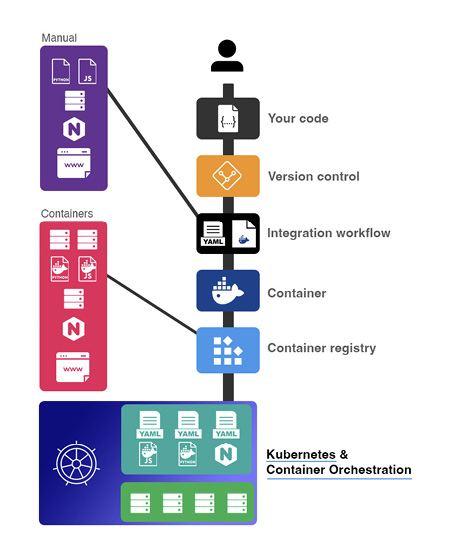
Trace the deployment progression from application fundamentals through containers and Docker Compose to Kubernetes. section 1.2
