A service that works on a developer’s machine but fails after deployment is hard to trust. A container runtime helps narrow that gap: it runs containers from images, giving an application a repeatable package for local use and production deployment. The runtime works with the host operating system and shares its kernel. An image acts like a template; one image can create many containers. Docker is the runtime used here, while Podman is an alternative. section 7.1 section 7.5
Figure 7.2 Applications work with an operating system within the container, which interacts with the container runtime. The runtime then runs as a process within the host operating system like any other application.
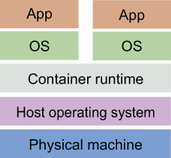
Follow the application through the container and runtime to the host operating system. The diagram locates the runtime in the execution path rather than treating the image as a running application. section 7.1
A small Go service provides a practical path from image to running application:
- Install Docker as the local runtime, then use `pack` and a Buildpack to create an image. The builder recognizes the Go project from its module file and finds a main package. section 7.3
- Run the image with Docker and call the service endpoint. This checks the packaged application locally before publishing it. section 7.3
- After tests pass, build and publish the image through the pipeline. Deploy that image to Google Cloud Run, then call the deployed endpoint as a smoke test. section 7.4 section 7.5
Build once, run locally
`pack build hello-api --builder gcr.io/buildpacks/builder:v1` creates the image; `docker run hello-api` starts a container from it. The image is the saved package, while the runtime does the work of running it. section 7.3
The same containerized application can be run locally and deployed through a managed platform. Cloud Run handles the underlying deployment work; a Kubernetes cluster is another possible destination, but operating one is not required for this workflow. Keep the useful feedback loop small: build, run, publish, deploy, and check the endpoint. section 7.5 section 7.9

