A container gives stored data a place to live. In Azure Blob Storage, it sits inside a storage account and groups blobs, much like a folder groups files. The blobs can hold different kinds of unstructured data, including images and documents. section 2.2.7 section 5.3.2
Figure 2.13 Storage account hierarchy: blobs inside containers inside a storage account
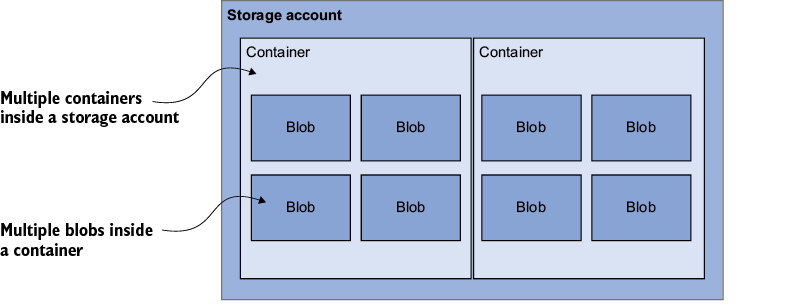
Follow the hierarchy from storage account to container to blob; creating an account alone does not create a place for blobs. section 2.2.7
When creating a Blob Storage container, decide:
- What to call it. A separate output container can keep resized images apart from incoming images. section 2.2.15
- Who may read it. The PowerShell Permission setting can be Off for owner-only access, Blob for anonymous access to blobs by direct address, or Container for public read access to the container and its blobs. Choose carefully: the wrong setting can expose data. section 5.3.2
Save email attachments
A Logic App can take attachments from incoming email and use Create Block Blob to store them in a chosen container. Selecting attachment content makes the operation repeat for each attachment—handy when one email brings more than one image. section 2.2.11 section 2.2.12
Containers can also supply application data. An AI Foundry pipeline can read review files from a Blob Storage container after its connection and managed identity have the required access. section 7.4.2
Watch the service name: a Cosmos DB container is not a Blob Storage container. It sits inside a database and holds documents. With the MongoDB interface, a collection acts as that container; its shard key and throughput settings affect distribution, performance, and cost. section 11.1


