container2wasm converts Linux container workloads into WebAssembly binaries by compiling CPU emulators, including QEMU, into Wasm. The emulator runs the existing Linux application with minimal modification, avoiding a manual port to WASI’s limited POSIX support. section 7.6.1
A practical container2wasm workflow is:
- Install the v0.8.3 release on Linux amd64 or arm64; use WSL on Windows or a Linux environment on macOS. section 7.6.2
- Create a Flask application and Dockerfile, using python:3.9-slim, port 8000, and a command that starts the server. section 7.6.3
- Build the image with docker build -t python-wasm-webserver ., then convert it with c2w python-wasm-webserver python-wasm-webserver.wasm. section 7.6.3
- Run the network-enabled binary with c2w-net --invoke -p localhost:8000:8000 and access it using curl. section 7.6.3
Flask server inside Wasm
A minimal Flask route returns "hello from inside a container running on Wasm". After conversion, c2w-net exposes the container’s port 8000 at localhost:8000, allowing curl to reach the server. A separate c2w ubuntu:22.04 ubuntu.wasm example demonstrates launching an interactive Linux environment with Wasmtime. section 7.6.3
The main trade-off is portability versus efficiency: CPU emulation broadens compatibility and enables browser or WASI execution, but adds virtualization overhead, larger binaries, and slower performance than raw Wasm. The approach supports sandboxed, offline-first, ephemeral, and in-browser Linux workloads. section 7.6.1 section 7.7
Figure 7.6 container2wasm encapsulates a CPU emulator to run Linux and Linux applications inside Wasm, enabling execution within either a WASI runtime or a browser environment.
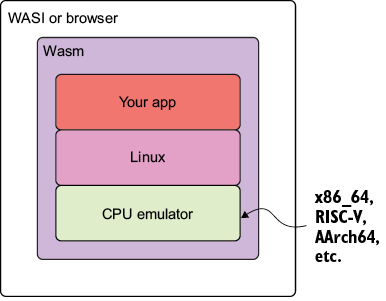
Use the architecture figure to trace how container2wasm encapsulates a CPU emulator, Linux, and the application inside a Wasm binary for WASI or browser execution. section 7.6.1
