A context diagram gives the highest-level view of a system: draw the whole system as one element, then show its relationships with users, external systems, APIs, and other dependencies. Use it to make system boundaries and actors easy to discuss before exposing internal structure. section 3.3
IT asset management system
An ITAM context diagram places the ITAM system at the center. A user interacts with it; the system persists state in a database and calls APIs through RESTful endpoints to create, update, delete, and fetch component details. This view emphasizes interactions inside and outside the system rather than classes or modules. section 3.3
Figure 3.8 The context diagram for the ITAM system as interpreted by ChatGPT. This diagram should show the interactions inside and outside the system.
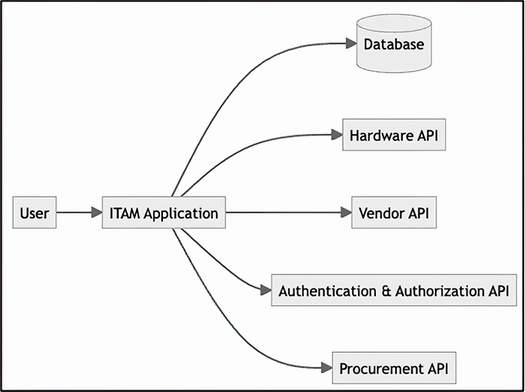
Use the rendered ITAM diagram to inspect the system boundary and its external interactions before refining the architecture. section 3.3
Move to a container diagram when the discussion needs the internal building blocks, technologies, and communication flow. Containers expose internals; a context diagram deliberately stays outside that boundary. section 3.3
