Context management deliberately organizes codebase information and prompts so an AI tool receives relevant project details instead of noise. Selective context improves focus, accuracy, and efficiency. section 10.5.2 section 10.9
Tune the context to the task by choosing among:
- Application files and folders, selected code, documentation, Git history, past chats, and project rules. section 10.5.2
- Terminal history and outputs, linter errors, or web search when debugging or researching. section 10.5.2
- Only the information relevant to the request; sending the entire application can add noise, reduce accuracy, slow responses, and consume token limits. section 10.5.2
Make a database request specific
A vague comment such as "Connect to a database" gives an AI assistant too little information. A more useful prompt names the technology and file: "Connect to a SQLite database. The file name is data/questions.db." The resulting Python suggestion imports sqlite3, opens the file, creates a cursor, executes a query, fetches results, and closes the connection. Review remains necessary: the generated example includes an illustrative users query that may not match the application. section 5.3.2
Figure 10.4 Different ways to add context in Cursor, offering a range of choices to help you refine your search or decide what to include in your questions
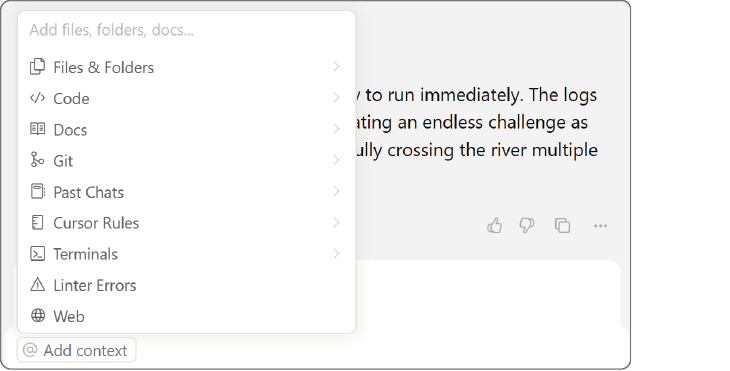
Use the context-source overview to compare files, code, documentation, Git, chats, rules, terminals, linter errors, and web search. section 10.5.2
Pair focused context with clear specifications, technical limits, and desired outcomes. Use stronger discipline for production, security-sensitive, and enterprise systems, where accountability and testing matter. section 10.9

