A context partition is a subset of events selected by an event-processing context’s inclusion criteria. A context can have one partition or many. Each partition is handled by a separate instance of an associated event-processing agent, so its local processing state is kept apart from other partitions. section 7.1 section 8.1.3
Think of separate counters for different locations: each counter tracks only the events assigned to its location. Similarly, a stateful agent can count events separately for each partition instead of producing one total for the entire stream. section 7.1
Partition membership depends on the context definition:
- Temporal context groups events into intervals, often called windows. Windows can overlap, so one event can belong to more than one partition. section 7.2
- Segmentation-oriented context groups events by one or more attribute values, such as driver or driver and store, or by predicates over event attributes. section 7.5
- Spatial context can group events by their relationship to predefined spatial entities. An event can match multiple entities or none. section 7.3.1
- State-oriented context has one partition and admits events when an external entity is in a relevant state. section 7.4
A composite context combines two or more contexts. Its partitions are the combinations of its members’ partitions. For example, grouping by customer and by hour creates a partition for each customer-hour combination. section 7.7.1
Counting daily assignments
In Fast Flower Delivery, a daily assignments calculator uses an Aggregate agent to count Assignment events for each driver on each day. Each driver-day partition supplies the events for a separate count. An Aggregate agent can retain events or derived data within a partition; by default, its derivation runs when a temporal partition closes. section 8.2.3
Figure 8.13. The Daily assignments calculator agent from the Fast Flower Delivery application. This shows how an Aggregate agent can be used to count the number of Assignment events associated with a given driver on any one day.
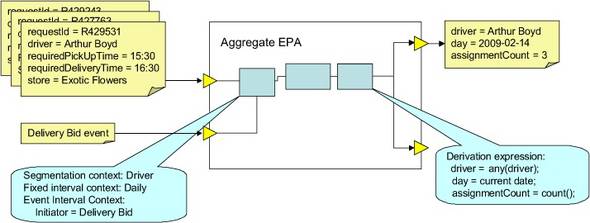
See how the daily assignments calculator combines driver and day to produce separate counts. section 8.2.3
An event that matches no partition is not handled by an instance of the associated agent. Logically, input-terminal filtering happens before partition selection; an agent instance may then apply further filtering. Temporal partitions can also be created and destroyed over time. section 8.1.3
Keeping state for many partitions or many accumulated events can strain memory. Disk-based persistence can improve space scalability and recoverability at a performance cost; replicated memory is another option, with network and synchronization overhead. section 10.4.2