When built-in analytics cannot show where users abandon a conversation, add context variables at key points in the dialogue. A context variable is a named value stored during a conversation, such as a task marker or an answer, that can be retrieved later. section 11.1.3 section 12.2.3
Use context variables to record information that helps explain or continue an interaction:
- Mark the start or completion of major flows and subflows, then track where users request an agent or leave. section 11.1.3
- Store meaningful fixed-format answers, such as a claim ID, order number, or account ID, for later use. section 12.2.3
- Retrieve stored values to build a structured or unstructured conversation summary. section 12.2.3
Track the exact dialogue step when investigating opt-outs: repeated trouble collecting address details across flows, for example, can point to a common cause. Collect only what is needed, limit how long it is stored, and review sensitive data handling with legal counsel. section 11.1.3 section 12.2.3
Figure 11.2 A breakdown of opt-out occurrences by step can aid in root cause analysis. In this chart, immediate opt-outs show prominently on the left, but trends indicate that there may also be a problem with collecting address details in multiple downstream flows.
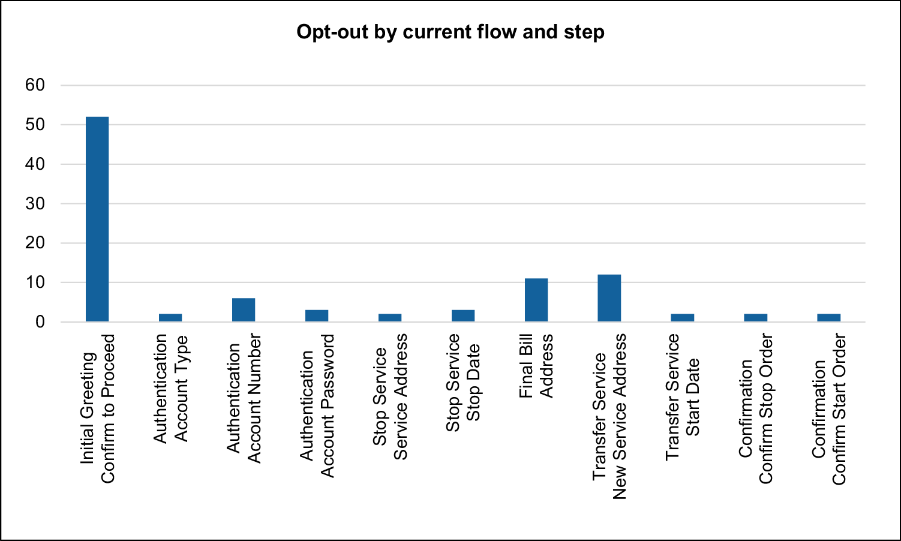
See how opt-outs grouped by dialogue step can reveal a recurring downstream problem. section 11.1.3

