A contour is a curve marking a model cross-section or printable layer. In image processing, it begins as the boundary between neighboring pixel values on opposite sides of a light/dark threshold. section 12.4.2 section 1.0
A practical contour-extraction pipeline proceeds in stages:
- Treat interpolated image values as a signed, quasi-distance function and define the target curve where it equals zero. section 12.4.5
- Create an initial border from one-pixel segments wherever neighboring cells straddle the threshold. section 12.4.2
- Fit each segment’s vertices toward the threshold curve with finite-difference derivatives and an iterative correction loop. section 12.4.5
- Estimate tangent vectors and replace straight segments with cubic polynomial curves; subdividing them into line segments makes plotting easier. section 12.4.5
From pixels to a smooth boundary
For a grayscale image, choose a distance threshold of 128. Opposite-sign samples identify the initial pixel border; iterative fitting moves its vertices onto the threshold isoline, and cubic curves produce a smooth contour. section 12.4.5
Figure 12.20 An initial contour is a border between pixels with values below the threshold and above.
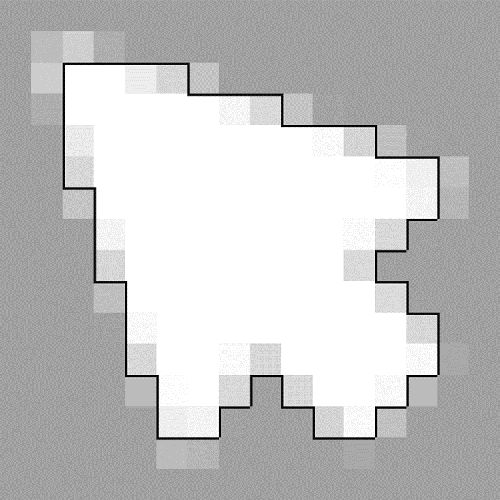
The figure makes the initial contour intuitive: it traces borders between pixels below and above the selected threshold before smoothing and fitting. section 12.4.2
