Contrast ratio compares the relative luminance of a lighter color with a darker one. It helps determine whether text and visualization elements stand out clearly against their background. section 4.4.2
Useful thresholds include:
- Use at least 4.5:1 for ordinary text and 3:1 for large-scale text or visualization elements. section 4.4.2
- For AAA contrast, use 7:1 for smaller-scale color and 4.5:1 for larger-scale color. section 4.4.2
- Calculate the ratio as (L1 + 0.05) / (L2 + 0.05), where L1 is lighter relative luminance and L2 is darker relative luminance. section 4.4.2
A border can rescue a weak bar
Blue bars against light gray measure only 1.93:1, but a dark-gray border measures 8.7:1 against the background. When a border defines the visible edge, evaluate the border rather than the fill alone. section 4.4.2
Figure 4.34 On the left, the blue bars have no border, so the contrast is calculated between the blue and the light gray as 1.93:1, which is too low to pass WCAG’s AA level of 3:1. However, if you add a dark-gray border, the contrast is then calculated using the border against the background, which shows up better than just the plain blue bars. The contrast between the darker gray border and the lighter gray background is a whopping 8.7:1, beating out the AA level by almost a factor of two.
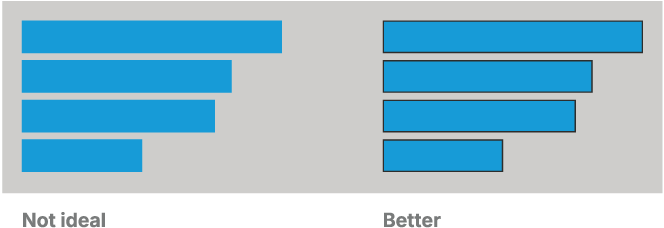
Compare the low-contrast blue bars with their dark-bordered version. section 4.4.2


