A control chart plots process observations in sequence against a center line (CL), an upper control limit (UCL), and a lower control limit (LCL). Its purpose is to distinguish expected variation from signals worth investigating. The CL commonly represents the process mean. Three-standard-deviation limits are a conventional starting point, not a universal setting: limits depend on the metric and may be adapted to the monitoring problem. section 14.0 section 14.1.1 section 14.1.2
Choose a chart for the observation being monitored:
- For attributes, chart defect proportions or counts; use a g-chart when the useful measurement is the number of units between rare defects. section 14.1.9 section 14.2.4
- For continuous measurements, use variable charts. An x-bar chart paired with an r-chart monitors both the process mean and variability. section 14.3
- For individual, time-ordered measurements rather than batches, pair an individuals chart with a moving-range chart. Calculate each moving range as |Xᵢ − Xᵢ₋₁| to track changes between successive observations. section 14.1.10 section 14.3.4
Calculate limits with a variability measure appropriate to the data: proportions and continuous measurements use different standard-deviation formulas. Check sample size, which affects the precision and sensitivity of some charts. A point beyond a limit calls for investigation; points inside the limits do not, by themselves, rule out a meaningful trend. Combining charts can reveal changes that one chart misses. section 14.1.3 section 14.1.5 section 14.4
Units between defects
For a g-chart, calculate the mean gap ḡ, then set UCL = ḡ + 3√[ḡ(ḡ + 1)] and LCL = max(ḡ − 3√[ḡ(ḡ + 1)], 0). Plot each gap against defect sequence and draw horizontal lines at these three values. In the illustrated sequence, all gaps lie within the limits, while the gaps generally increase; inspect both the limits and the pattern rather than relying on a single verdict. section 14.2.4
Figure 14.4 This g-chart displays the number of units between defects; it highlights process stability, with all points falling within the control limits. Additionally, it shows an improving process, as the number of manufactured units between defects is trending upward.
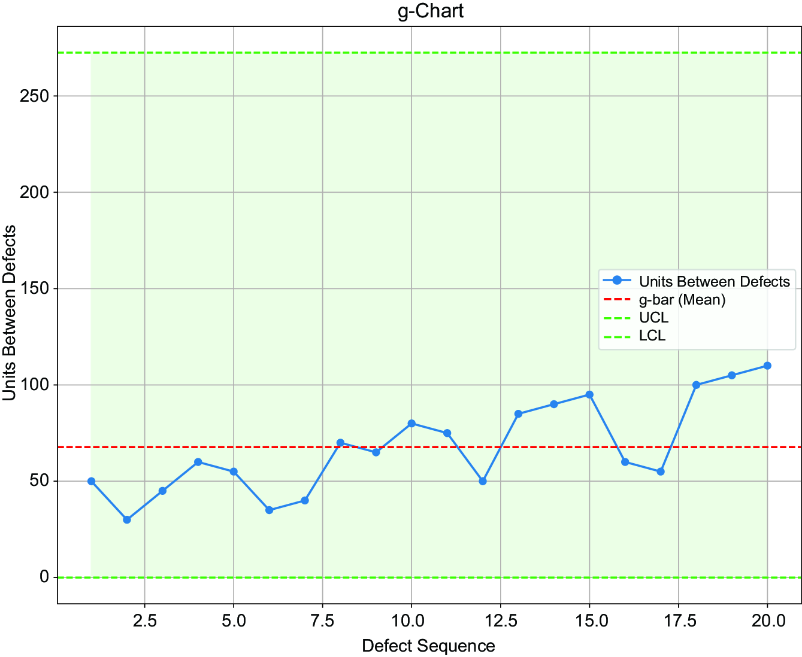
The plotted gaps make the upward pattern visible alongside the g-chart’s center line and limits. section 14.2.4
