A Kubernetes controller is a control loop that keeps part of a cluster aligned with a desired state. You create or change an object through the Kubernetes API; its controller notices the change and acts on it. You specify the result you want, rather than every step needed to reach it. section 14.3.1 section 3.3.3
The loop has three parts: observe the current state, compare it with the state specified by an owning object, and change dependent objects when they differ. Most API object types have an associated controller. Controllers run in the control plane; worker-node components run the application containers. section 14.3.1 section 1.2.3
Figure 14.6 The ReplicaSet controller’s reconciliation loop
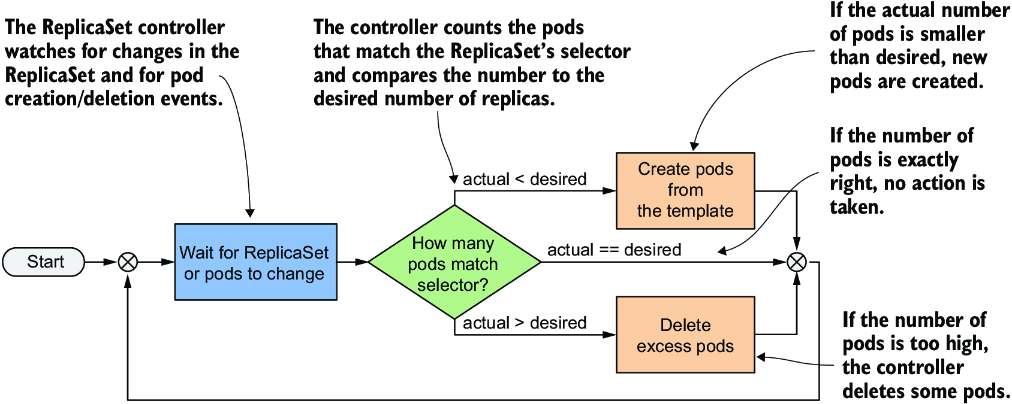
Follow the ReplicaSet controller’s loop from observing pods and the requested replica count to creating or deleting pods. section 14.3.1
Keep three pods running
Set a ReplicaSet’s desired replica count to three. If a managed pod is deleted, the ReplicaSet controller creates a replacement; if too many matching pods exist, it deletes the excess. The controller uses the ReplicaSet’s label selector to decide which pods count—not their names. To stop replacements, change or remove the object that specifies the desired count rather than repeatedly deleting its pods. section 14.3.1 section 14.3.2 section 5.6.3
Controllers can form a chain. A Deployment controls a ReplicaSet, and that ReplicaSet controls pods. For example, run `kubectl scale deploy kiada --replicas 5`: the Deployment controller changes the ReplicaSet’s desired count, and the ReplicaSet controller creates the pods. Changing the owned ReplicaSet’s count directly may not stick—the Deployment controller can restore the value specified by the Deployment. section 15.1 section 15.1.2
A controller’s responsibility has limits. The ReplicaSet controller maintains the number of matching pods, but updating its pod template does not immediately update existing pods. Updating a Deployment’s pod template does replace pods; its configured update strategy determines how. A pod that remains present but fails readiness also need not be replaced merely to satisfy the ReplicaSet’s count. section 14.5 section 15.2 section 14.3.2
To see what happened, inspect an object with `kubectl describe` or list Event objects with `kubectl get events`. ReplicaSet events can report pods created or deleted by its controller. section 14.3

