A core point is a DBSCAN observation with at least minPts points within ε distance, counting the observation itself. It meets the minimum density threshold and forms a building block of a cluster. section 2.5.2
Determine whether an observation is core by checking:
- The neighborhood radius ε. section 2.5.2
- The minimum point count minPts, including the observation itself. section 2.5.2
- Whether the neighborhood satisfies the density requirement; otherwise, classify the observation as a border point or outlier. section 2.5.2
DBSCAN parameter choices
A DBSCAN run can use eps = 0.0375 and min_samples = 6, or eps = 1.5 and min_samples = 5. These values determine which observations qualify as core points. section 2.5.2
Figure 2.29 Core points are shown as squares; border points are shown as filled circles, while noise is unfilled circles. Together, these three are the building blocks for DBSCAN clustering.
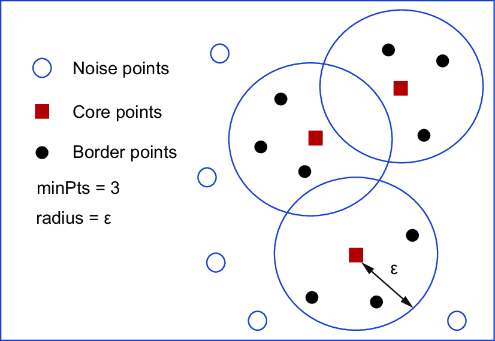
Use the figure to distinguish core points from border points and noise in a DBSCAN cluster. section 2.5.2

