Azure Cosmos DB is a globally distributed NoSQL database service for applications that need to handle growing data and traffic. It supports key-value, document, and graph data models. An online store, for example, might use it for a changing product catalog and customers shopping from different regions. section 11.0
Start with an account, create a database inside it, then create a container to hold documents. The Azure CLI examples use a MongoDB-compatible account, set Session as its default consistency level, and provision throughput for a collection. Those choices are configuration decisions, not a promise that every workload needs the same settings. section 11.1 section 11.1
Figure 11.1 A Cosmos DB account holds databases, which in turn has containers that hold documents.
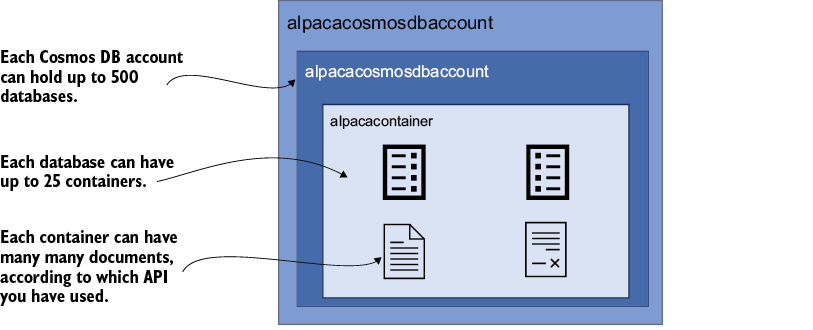
The diagram shows where documents live: inside containers, which sit inside databases within an account. section 11.1
Plan the data before turning up the scale. A partition key determines how documents are distributed and helps locate data for queries. For a product catalog, a category key can keep related products together—but a key that concentrates too much traffic or data in one partition creates a bottleneck. Aim for values that distribute data evenly. section 11.3.2
The useful knobs come with trade-offs:
- Replicate data across Azure regions to reduce read latency and maintain availability during a regional failure. Configure failover priority, and consider zone redundancy within regions. section 11.4.2
- Use consistency models to match an application's reliability needs; Session is the default selected in the account example. section 11.1 section 11.7
- Watch request-unit consumption, latency, and storage in Azure Monitor. Alerts can warn an operations team when consumption approaches its limit. section 11.6.2
Cost depends on the workload as well as the amount of data. Provisioned request units per second suit transaction-heavy, variable traffic; for certain MongoDB and PostgreSQL workloads, vCore pricing allocates CPU and memory and can suit predictable, compute-intensive work. Compare usage patterns before choosing—extra capacity is useful, but it is not free. section 11.6.3
For insights beyond serving application requests, Cosmos DB can integrate with Azure Synapse Analytics, Azure Functions, and Azure Stream Analytics. These connections support near-real-time analysis of customer behavior, inventory, sales, or data streams. section 11.5 section 11.7
