A CPU ACL filters traffic to and from a Cisco WLC itself, protecting control-plane services such as management access and CAPWAP traffic. It differs from an ACL applied to user or WLAN data traffic because it targets the WLC’s control-plane CPU. section 21.4
Configure a CPU ACL from the WLC GUI:
- Open the Security tab and expand Access Control Lists. section 21.4
- Create and name an ACL in the Access Control Lists menu, then define its rules. section 21.1.3
- Open CPU Access Control Lists and apply the configured ACL to filter traffic destined for or originating from the WLC. section 21.4
Figure 21.3 WLC management connection methods. The CLI can be accessed via the console port or a network connection (Telnet/SSH). The GUI can be accessed over the network via HTTP/HTTPS. The WLC can authenticate users by checking its local user database or a TACACS+/RADIUS server.
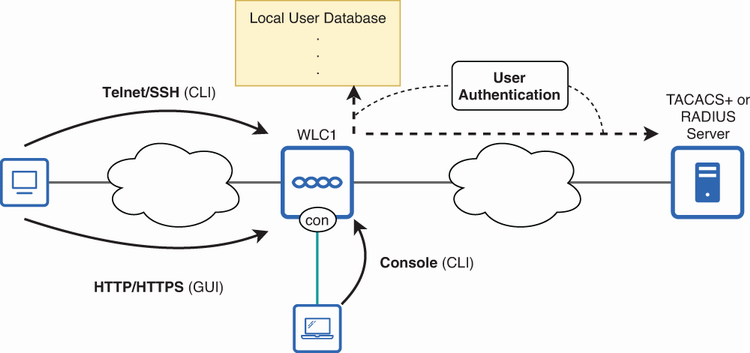
Place CPU ACLs within the broader WLC management boundary: network management uses Telnet, SSH, HTTP, or HTTPS, while authentication can use local credentials or TACACS+/RADIUS. section 21.1.3
