A cross-origin request is an HTTP request from a web page to a different origin, such as another domain, subdomain, port, or protocol. Browsers block cross-origin access by default, while CORS lets an API declare which requests are allowed. section 29.3 section 29.3.1
A CORS policy can control:
- Which origins may call the API. section 29.3.4
- Which HTTP methods and request headers the browser may send. section 29.3.1 section 29.3.4
- Which response headers the browser may read and whether authentication credentials are included. section 29.3.1 section 29.3.4
- Which endpoints receive the policy, from the whole application to individual minimal API endpoints, route groups, controllers, or actions. section 29.3.3
A browser preflight
Before some cross-origin requests, the browser sends an OPTIONS preflight request. If the API responds with suitable CORS headers, the browser sends the real request; without those headers, the browser blocks the application from reading the response. section 29.3.1
Listing 29.4 Applying a CORS policy to minimal API endpoints
WebApplicationBuilder builder = WebApplication.CreateBuilder(args);
builder.Services.AddCors(options => { /* Config not shown*/});

var app = builder.Build();
app.UseCors();                                          #1

app.MapGet("/api/products", () => new string[] {})
    .RequireCors("AllowShoppingApp");                   #2

app.MapGet("/api/products",
    [EnableCors("AllowShoppingApp")] () => new { });    #3

app.MapGroup("/api/categories")
    .RequireCors("AllowAnyOrigin");                     #4

app.MapDelete("/api/products",
    [DisableCors] () => Results.NoContent());           #5

app.Run();
#1 Adds the CorsMiddleware without configuring a default policy
#2 Applies the AllowShoppingApp CORS policy to the endpoint
#3 You can apply attributes to the lamba or handler method, as well as to MVC action methods.
#4 You can apply CORS policies to whole route groups.
#5 The DisableCors attribute disables CORS for the endpoint completely.
Use the endpoint example to compare application-wide middleware with selective RequireCors, EnableCors, and DisableCors metadata. section 29.3.3
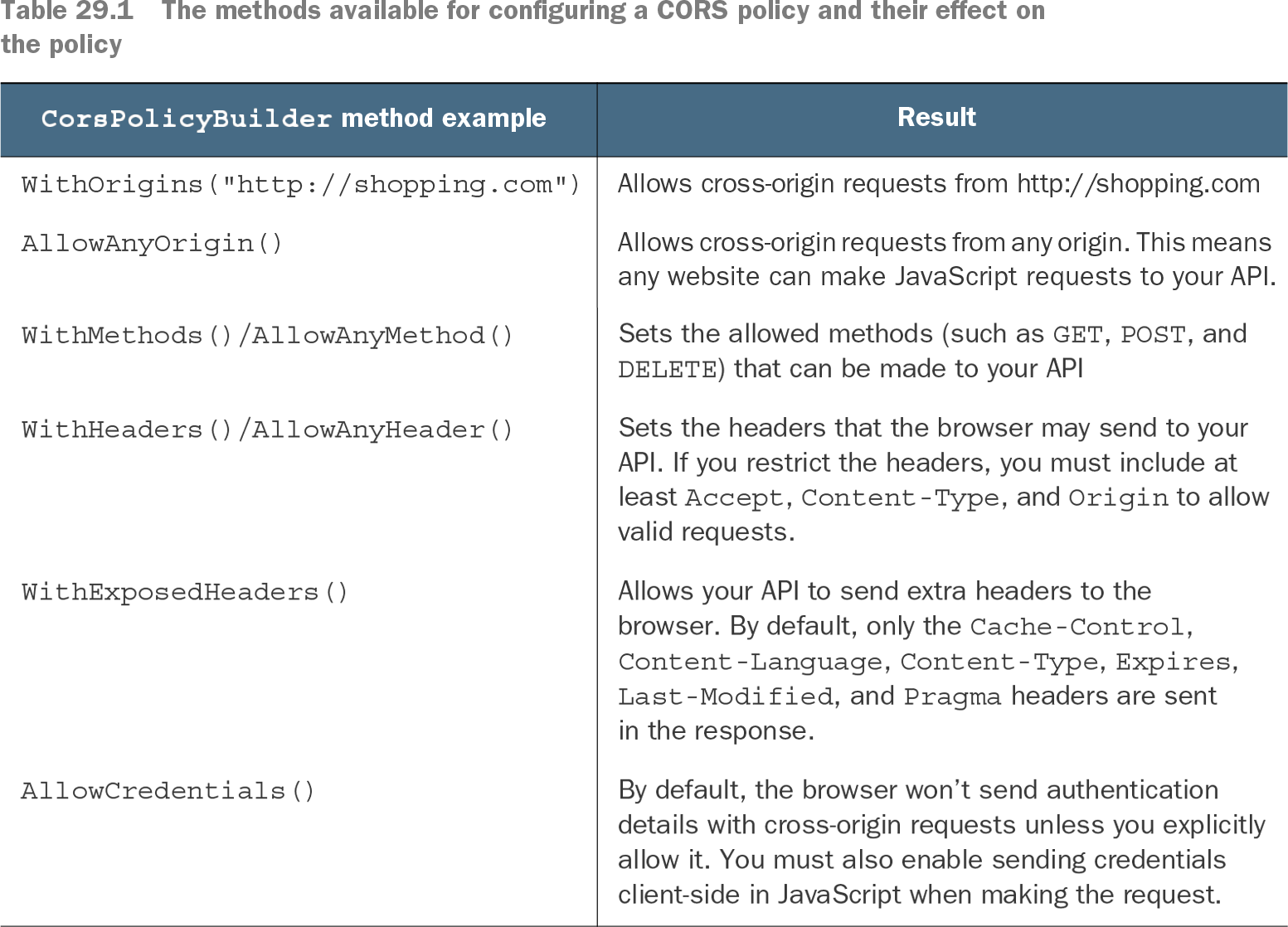
Table 29.1 The methods available for configuring a CORS policy and their effect on the policy (view table figure)
Use the policy table to compare origin, method, header, exposed-header, and credential settings. section 29.3.4