The CSS cubic-bezier() function defines a custom timing function from four values representing two control points. Adjusting a handle changes how quickly a transition progresses over time, rather than merely choosing a preset such as ease-in or ease-out. section 15.2.1
Choose a curve according to the interaction:
- Use linear for color changes and fade-in or fade-out effects. section 15.2.1
- Use a decelerating curve for user-initiated changes, such as clicks and hovers, so the response begins quickly and settles smoothly. section 15.2.1
- Use an accelerating curve for system-initiated changes, such as loaded content or timeout-triggered motion. section 15.2.1
- Reuse a small set of curves for consistency, while allowing ease-in-out or bounce effects when the motion calls for them. section 15.2.1
A subtle bounce on navigation labels
A hidden label can begin at translate: -1em and opacity: 0, then transition to translate: 0 and opacity: 1. The custom cubic-bezier(0.2, 0.9, 0.3, 1.3) curve moves the label slightly beyond its final position before it settles, adding weight and momentum. Slow the transition to make the subtle bounce easier to observe. section 16.2.2
Figure 15.5 Editing a Bézier curve in the Chrome DevTools
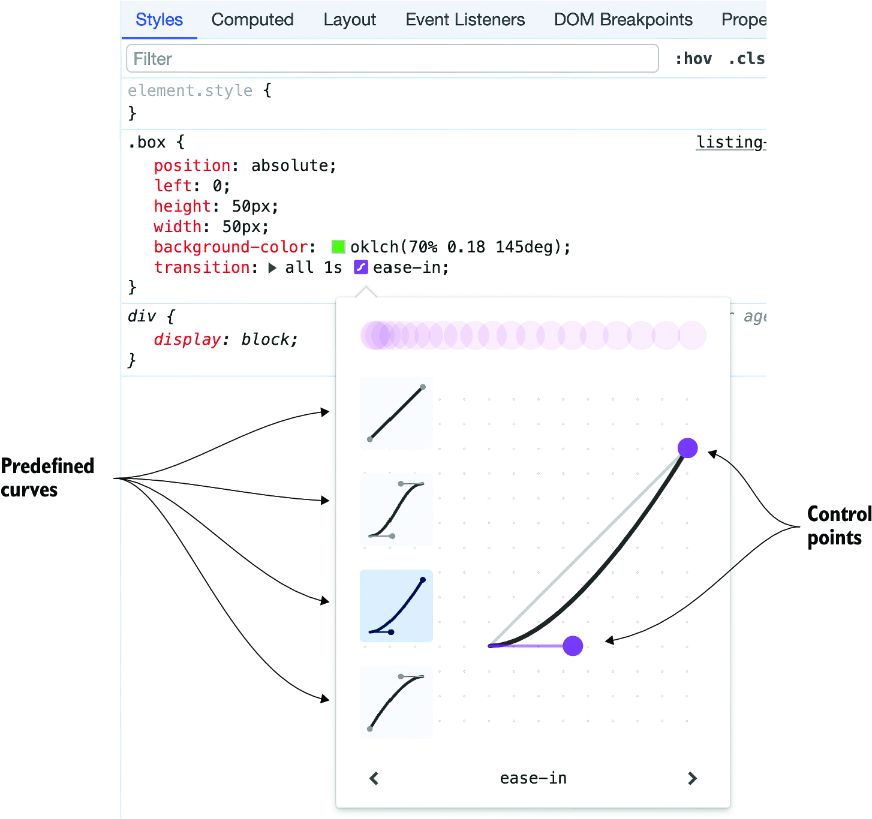
Edit the curve in Chrome DevTools by dragging its control-point handles, then inspect the resulting cubic-bezier() value. section 15.2.1

