curl is a venerable open-source command-line data-transfer tool, often already installed. Type curl at a command prompt to confirm it is available; a help message is the expected sign of life. section 2.4
For generative-AI work, curl is the no-Python route: use generated request code or write requests directly when an API offers curl snippets. An endpoint is the API address used in code to access a resource. section 2.4 section 5.2
Upload a PDF, then ask it a question
A ChatPDF session takes two POST requests. First, send an API key and a PDF URL to add the source; the successful response returns a sourceID. Then send that sourceID with a user message to request an answer. Keep the API key in place of the dummy sec_xxxxxx value. section 5.2
Figure 5.2 The request/response process using the ChatPDF API
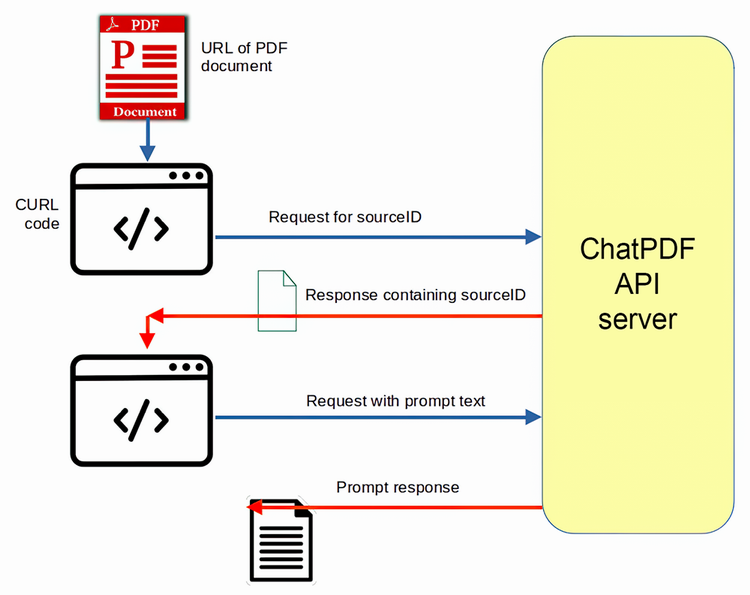
Follow the request/response flow before scripting it; the first request prepares the PDF source, and the next sends the chat prompt. section 5.2
A readable Bash request has a few moving parts:
- Use -X POST to choose the request method and point curl at the API address. section 5.2
- Use -H headers for the API key and JSON content type. section 5.2
- Use -d to send JSON data, such as a PDF URL, sourceID, or message. section 5.2
- Split a long command across lines with trailing backslashes in Bash—but make the backslash the final character, because even a stray space breaks continuation. section 5.2
Once the two requests work by hand, curl can sit inside a shell script that reads input line by line and sends topic-specific prompts. That is where a one-off query turns into repeatable automation—without pretending the returned answer needs no checking. section 5.2

