A custom element name is the registered, hyphenated HTML tag name that connects a web component class with its markup. It must be lowercase and contain at least one hyphen, distinguishing it from built-in elements such as div and textarea. section 3.1
Follow these naming and registration rules:
- Avoid uppercase letters, a leading hyphen, reserved SVG and MathML names, and names already registered. section 3.1.1
- Register the name with customElements.define and a class extending HTMLElement; the browser then upgrades matching document elements. section 1.4 section 3.1.1
- Write custom elements with explicit closing tags, even when they have no content. section 3.1
- Check customElements.get before defining a name when repeated loading or library conflicts are possible. section 3.1.1
A hello-world element
class HelloWorld extends HTMLElement { connectedCallback() { this.innerHTML = "<p>Hello, World!</p>"; } } customElements.define("hello-world", HelloWorld); <hello-world></hello-world> The hyphenated name is registered globally, and the matching tag is upgraded when the browser processes the page. section 3.1.1
Figure 1.3 Step-by-step flow, from initial page request to functioning web components.
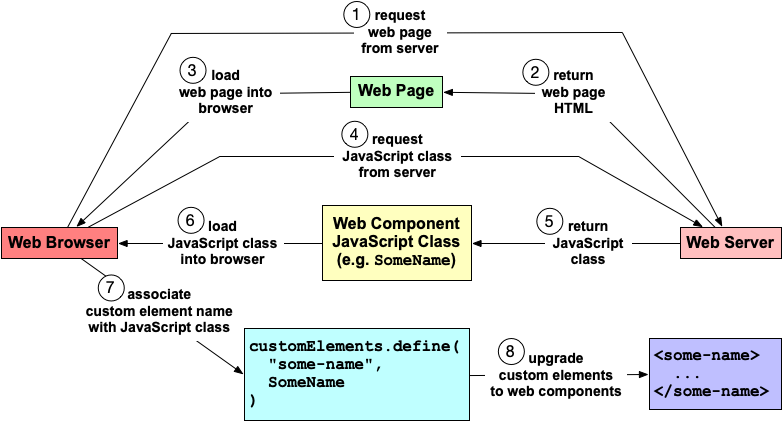
Trace the path from page loading and script execution to custom element registration and browser upgrade. section 1.4
