A custom URL scheme gives an app its own URL prefix, such as auth.com.mildredsurf.stocktake://. After the operating system registers that prefix for the app, opening a matching URL activates the app instead of treating the address as a normal web link. This is useful when a browser or another application must return control to a mobile or desktop app. section 8.1.2 section 8.5
A common use is an OAuth2 sign-in callback. The app supplies a redirect URI when it opens an identity-provider login page. Once the user signs in, the identity provider sends an authorization response to that URI. With a web app, the redirect commonly points back to the site; with an installed app, a registered custom scheme routes the response back into the app, where the authorization code can be processed for tokens. section 8.1.2
Authentication redirect URI
Use a redirect URI such as auth.com.mildredsurf.stocktake://callback. Here, auth.com.mildredsurf.stocktake is the scheme and callback is the host. Keep this value in a shared constant, then pass it both to WebAuthenticator and to OidcClientOptions so the browser callback and authentication client expect the same address. section 8.1.2
Figure 8.4 When authenticating with an IDP, a redirect URL is supplied. Upon successful authentication, a response is sent back to the redirect URL. For a web application, this redirect is usually the address of the web application where the authentication request originated. For a mobile or desktop app, the URL uses a custom scheme that the OS associated with the app, so the response from the IDP is sent to the app.
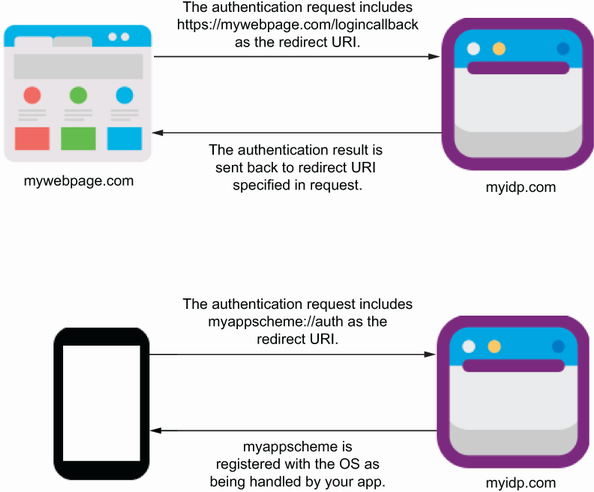
Follow the redirect path from the identity provider back to an installed app through a URL scheme associated with that app. section 8.1.2
Register the same scheme on every target platform that must receive the callback:
- On Android, create a WebAuthenticatorCallbackActivity and give it an IntentFilter for the view action, browsable and default categories, the scheme, and the callback host. Add the manifest query for the Custom Tabs service so the browser flow can be opened. section 8.1.2
- On iOS and macOS, add a CFBundleURLTypes entry to Info.plist. Supply an identifier, place the scheme under CFBundleURLSchemes, and set the role to Viewer. section 8.1.2
- On Windows, add a windows.protocol extension to Package.appxmanifest and set its protocol name to the scheme. section 8.1.2
Registration alone routes the callback; the authentication flow still needs code to open the login URL and consume the returned result. An AuthBrowser implementation can call WebAuthenticator.AuthenticateAsync with the start URL and redirect URI, parse the returned authorization code, and return it to OidcClient. Configure that browser together with the authority, client ID, scope, and redirect URI before calling LoginAsync. section 8.1.2
Choose a scheme that identifies the app clearly, register exactly that scheme on each platform, and ensure the redirect URI used by the identity provider matches the URI supplied in code. A mismatch prevents the operating system from delivering the browser response to the intended callback. section 8.1.2
