A customer-managed key (CMK) lets Azure Storage use an encryption key you control to protect data. Store the key in Azure Key Vault or Azure Key Vault Managed HSM; Azure Storage uses it to control access to the account encryption key used for encryption and decryption. section 5.1.5 section 5.1.6
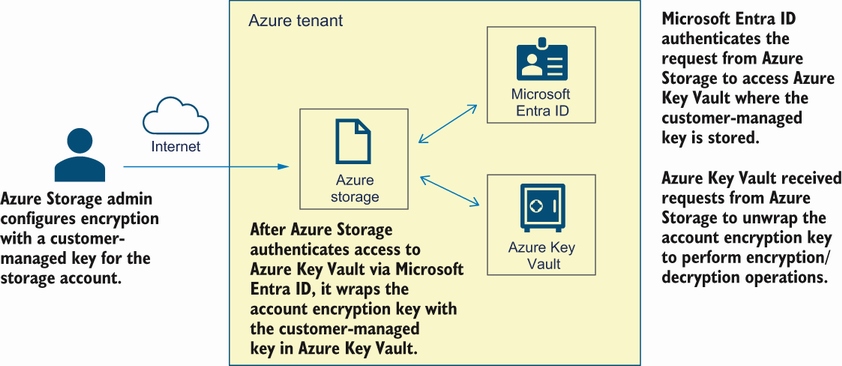
Trace how a storage account authenticates with a managed identity, wraps its account encryption key with the Key Vault key, and requests unwrapping when needed. section 5.1.6
Configure a CMK for an existing storage account in this order:
- Create or select a Key Vault or Managed HSM, then create the encryption key. Creating a key requires the Key Vault Crypto Officer role. section 5.1.7
- Assign a managed identity to the storage account. Existing accounts can use a system-assigned or user-assigned identity; new accounts require a user-assigned identity. section 5.1.7
- Grant the identity Key Vault access. It needs get, wrapkey, and unwrapkey permissions; the demonstrated RBAC assignment uses Key Vault Crypto Service Encryption User. section 5.1.6 section 5.1.7
- Update the storage account with the key name, Key Vault source, and vault URI to configure automatic key-version updating. section 5.1.7
- Explicitly include Queue and Table storage with Account encryption-key-type parameters when creating an account, because CMK protection is not enabled for them automatically. section 5.1.6
A Key Vault may be in a different tenant, region, or subscription from the storage account. The storage account authenticates to Key Vault through Microsoft Entra ID rather than by embedding key credentials. section 5.1.6
Separate customer data with an encryption scope
Apply a CMK-backed encryption scope to a container or individual blob when data inside one storage account needs separate boundaries. Assign the storage identity access to the vault or HSM, then create the scope with Microsoft.Keyvault and the Key Vault key URI. section 5.1.8
CMKs are one layer of storage protection. Encryption scopes provide narrower boundaries than account-wide encryption, while infrastructure encryption is configured when the storage account is created and cannot later be enabled or disabled. section 5.1.8 section 5.3

