d3.bin() groups numeric data into bins so a distribution can be drawn. Create a bin generator, optionally choose the numeric field with .value(), then call the generator with data. The result is a new array of bins rather than the original records. section 6.1
Bin salary records
For records with a salary field, configure the generator with .value(d => d.salary) and call it with the loaded data. Each resulting bin is an array of its member records; use x0 and x1 for its lower and upper boundaries, and use length for its count. section 6.1
Figure 6.2 To visualize a distribution with D3, we pass the original dataset to function d3.bin(). This function returns a new dataset that includes the bins, their boundaries, and their corresponding data points.
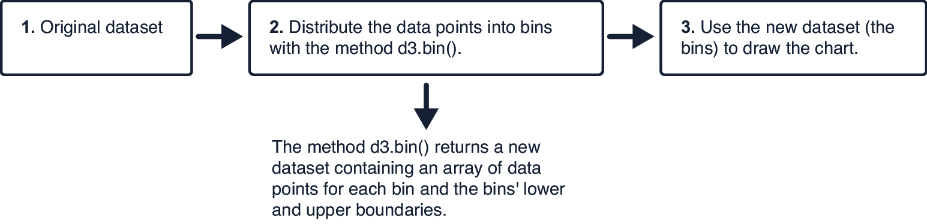
Inspect how one input dataset becomes bins that retain both their boundaries and their corresponding data points. section 6.1
Bind bins to rectangle elements to make a histogram, where bar size represents the number of records in each bin. Generate separate salary bins to compare women’s and men’s distributions in a pyramid chart. For violin plots, bin each role’s salaries and map bin counts to the plot width before smoothing the outline. section 6.3 section 6.5
Practical rules:
- Use bin boundaries, x0 and x1, to position each interval along a numeric axis. section 6.1
- Use bin.length to encode how many data points fall within an interval. section 6.5
- Draw a histogram first when constructing a violin plot, then form an area through the bin tips. section 6.6
