d3.treemap() is a D3-hierarchy layout generator that converts a hierarchical root into nested rectangles. It calculates positions and sizes for nodes, which can then be drawn as SVG rectangles. section 11.4
Build a treemap by following this workflow:
- Format CSV or JSON data into a hierarchical root structure. section 11.4
- Configure the layout with size(), paddingInner(), and paddingOuter(). section 11.4
- Apply the layout, draw one rectangle for each leaf, and use the generated position and size values. section 11.4
- Add labels to the rectangles and consider hiding labels in smaller areas. section 11.4
100 most spoken languages
A treemap can show the 100 most spoken languages as leaf rectangles, with each rectangle sized in proportion to the language's total number of speakers. section 11.4
Figure 11.14 To create a hierarchical visualization with D3, we start by formatting CSV or JSON data into a hierarchical data structure called root. From this root, we can generate a circle pack, a treemap, a tree chart, or an icicle chart. Each chart has its own layout generator that calculates the layout and appends the information required to build it into the dataset. We then use this information to draw the shapes we need: circles, rectangles, or links.
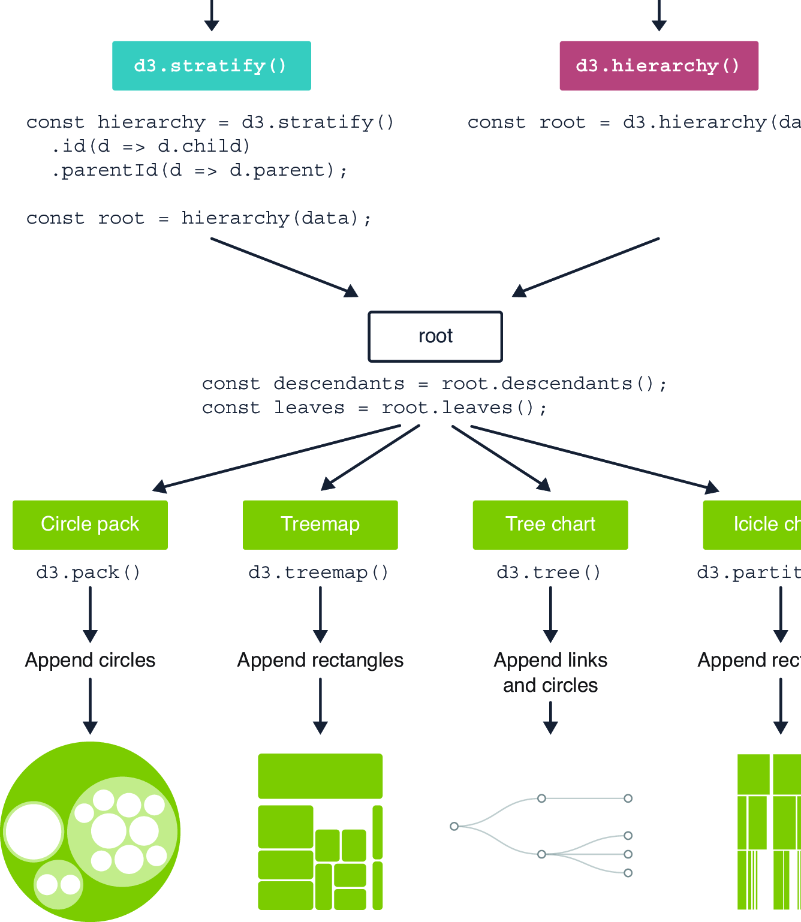
Trace how one hierarchical root supports multiple D3 layouts, including treemaps, and how each layout adds drawing information to the dataset. section 11.4
