A data collection rule (DCR) configures Azure Monitor Agent (AMA) collection from an Azure VM guest OS. It defines the data sources to collect, the destination, and transformations applied before delivery. DCRs make guest OS telemetry intentional rather than automatic, helping separate security-relevant logs from lower-value performance data. section 9.4 section 9.10
Use a DCR to send different VM data to appropriate Log Analytics workspaces. This supports multihoming: performance data can go to one workspace while security events go to another, avoiding Sentinel ingestion charges for data with limited security value. section 9.1.4
Create a DCR for VM monitoring by following this sequence:
- In Azure Monitor, create a rule; choose its subscription, resource group, and platform type: Linux, Windows, or Custom. section 9.4.1
- Associate the target resources, such as Linux or Windows VMs. Selecting Azure VMs for collection automatically installs AMA; Windows 10 and 11 devices require separate AMA installation. section 9.4.1
- Select or create a data collection endpoint when needed. The endpoint must be in the same region as the connected AMA instances, so deployments spanning regions need an endpoint per region. section 9.4.1
- Add data sources and destinations, then review and create the rule. For Windows event collection, choose Windows Event Logs and select Security and System events before adding the destination. section 9.9
Filtering sensitive and unnecessary data
A transformation can filter incoming customer credit-card information so it is not stored for privacy or compliance reasons. The same mechanism can discard unneeded, non-sensitive data before it reaches a Log Analytics workspace, reducing ingestion costs. section 9.4
DCR access should be planned before deployment. Creating or editing a rule requires Monitoring Contributor on the subscription, resource group, or existing DCR; associating it with a VM requires Virtual Machine Contributor or Azure Connected Machine Resource Administrator on that resource. Template deployment also requires permissions for Microsoft.Resources/deployments actions. section 9.4
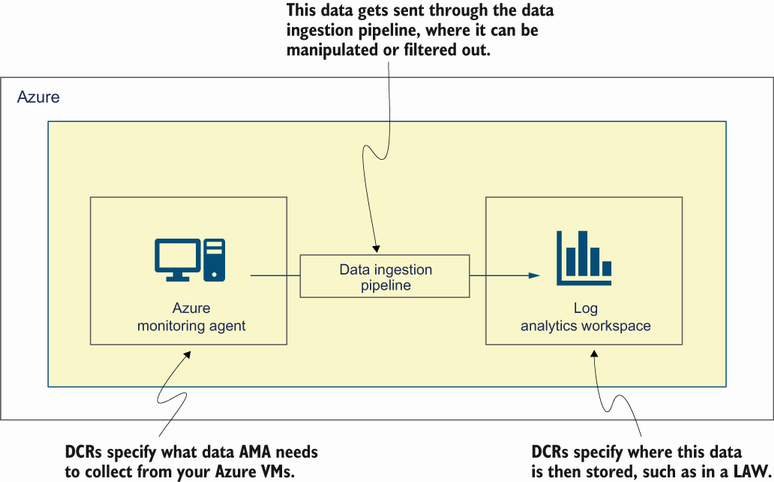
View the relationship between the guest OS, AMA, DCRs, and the monitoring data flow. section 9.4
