liveBook · Manning

Data-driven graphics

As explained in D3.js in Action, Third Edition

Data-driven graphics are visual graphics whose structure or appearance is determined by data values.

Data-driven graphics connect dataset values to visual structure, such as rectangle lengths and heights in a histogram or bars in a chart. section 1.1.3

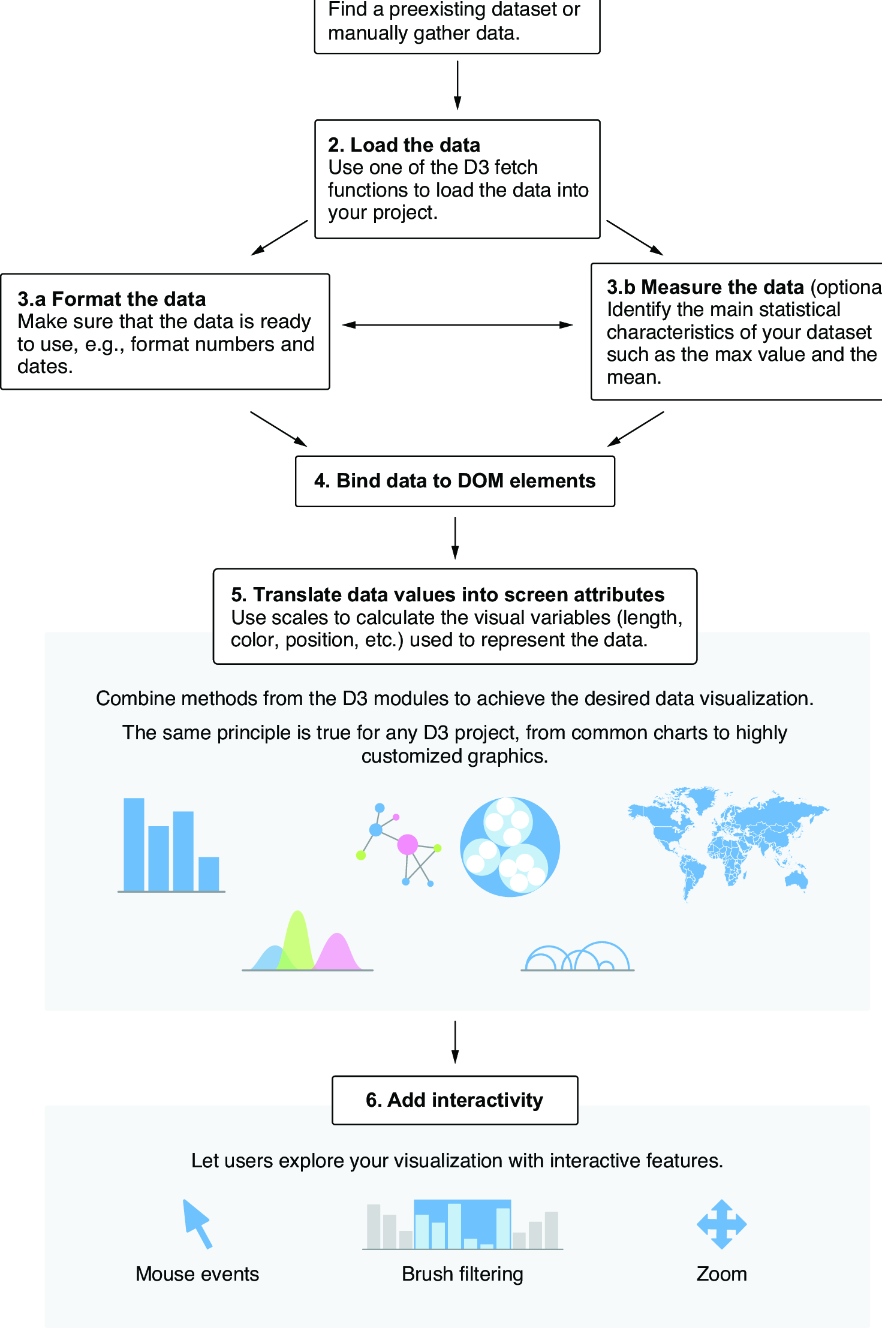
D3.js builds these graphics explicitly: load data, format values, inspect characteristics, combine visualization functions, and add interaction. section 1.1.3

A practical construction workflow includes:

  • Load CSV or JSON data with the d3-fetch module. section 1.1.3
  • Format numbers and dates, then identify useful characteristics such as minimum and maximum values. section 1.1.3
  • Use scales to calculate visual dimensions and functions to create marks and axes. section 1.1.3
  • Listen for mouse events to support filtering or zooming. section 1.1.3
Figure 1.7 How to approach data visualization with D3.js
figure

Use the workflow diagram to navigate the progression from dataset loading through preparation, visualization, and interaction. section 1.1.3

How D3.js in Action, Third Edition covers it

How deep it goes
Traces a practical workflow from loading and formatting data through scales, marks, axes, and interaction.
Examples
Uses a histogram, a bar chart, CSV or JSON datasets, axes, mouse filtering, and zooming as concrete examples.
What you can do after
Build it from scratch by loading data, preparing values, mapping them with scales, drawing graphics, and adding interaction.
How it connects
Connects D3.js with d3-fetch, scales, histograms, bar charts, axes, and interactive filtering or zooming.

Related concepts

This explainer was generated by Manning's knowledge graph from the text of D3.js in Action, Third Edition. The section links point to the parts of the book it draws on.