Data loss prevention (DLP) uses monitoring and policies to detect and prevent unauthorized transfers of sensitive information. It helps keep customer records, personal data, and proprietary documents within authorized environments. section 14.3.8 section 14.7
Encryption makes data unreadable to unauthorized people; DLP addresses a different problem: sensitive data being copied or sent where it does not belong. A file protected while stored can still be emailed, uploaded, or carried away on a USB drive. section 14.0
A DLP system can watch several places where data moves:
- Networks, email, and cloud services, where information may be sent outside the organization. section 14.3.8
- Workstations and removable media, where a person may copy files or attach them to messages. section 14.3.8
- Storage systems, alongside other monitoring points connected to a central DLP server. section 14.3.8
DLP tools can identify sensitive information through patterns, keywords, and content inspection. Fingerprinting helps detect copies of known sensitive files; digital watermarks help trace documents. When activity violates a policy, a system may log and alert on it, block the transfer, or quarantine the data for investigation. section 14.3.8
A customer list headed out
An employee tries to copy a protected customer list to a USB drive or email it outside the company. A properly configured DLP system prevents the transfer, records the attempt, and notifies the security team. section 14.3.8
Figure 14.7 Overview of enterprise Data Loss Protection (DLP) architecture with centralized policies enforced on network, endpoint, and storage layers.
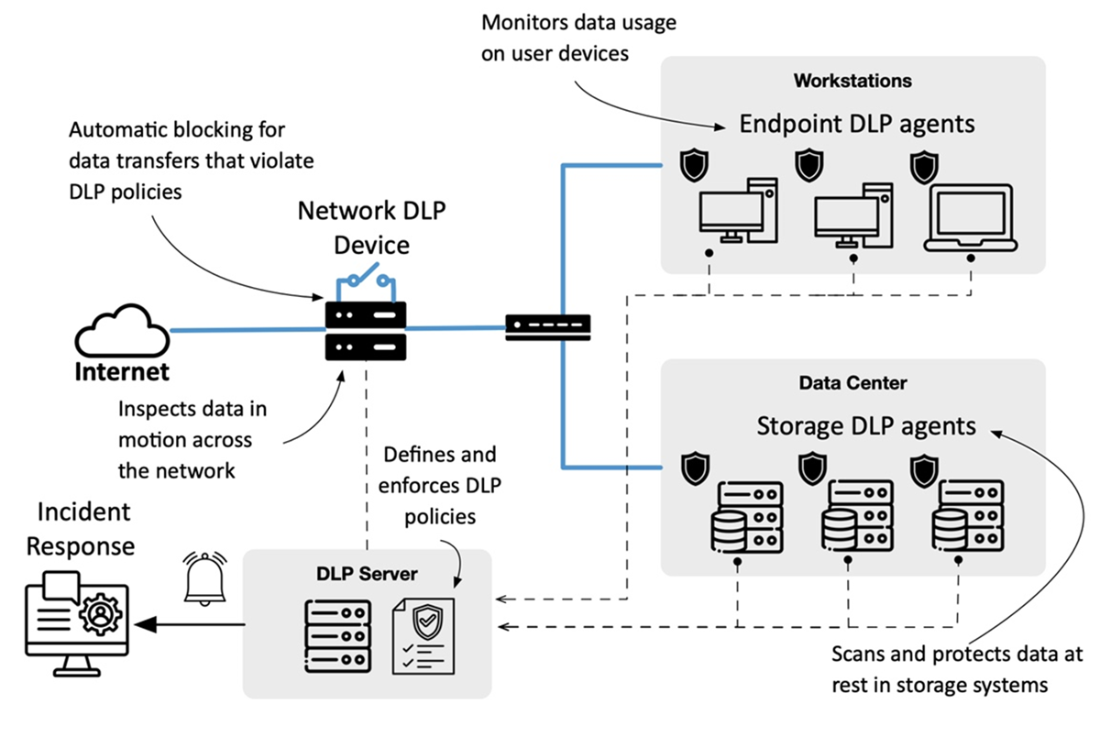
The architecture diagram shows how centralized policies connect network, endpoint, and storage DLP monitoring. section 14.3.8