liveBook · Manning

Data structure

As explained in Practical Automation with PowerShell: Effective scripting from the console to the cloud

A data structure is an organized representation of data and associated relationships for storing and processing information.

A data structure organizes external data so reusable PowerShell functions can process it without repeating registry-checking code. For security baselines, it prevents separate, growing scripts for operating-system versions and server roles. section 6.2

Design the structure from the conditions the automation must evaluate:

  • Represent each registry check with a key path, key name, expected value, and evaluation rule. section 6.2.1
  • Map equality and greater-than-or-equal conditions to PowerShell comparison operators such as -eq and -ge. section 6.2.1
  • Represent a range with an array and -in, and represent alternatives with nested operator-and-value tests. section 6.2.1
  • Use a class when the structure must preserve integrity, then store related data externally in human-readable serialized files. section 6.2 section 6.4

Registry check with alternative tests

@{ KeyPath = 'HKLM:\SYSTEM\Path\Example' Name = 'SecurityKey' Tests = @( @{ operator = 'eq'; value = '1' } @{ operator = 'eq'; value = $null } ) } section 6.2.1

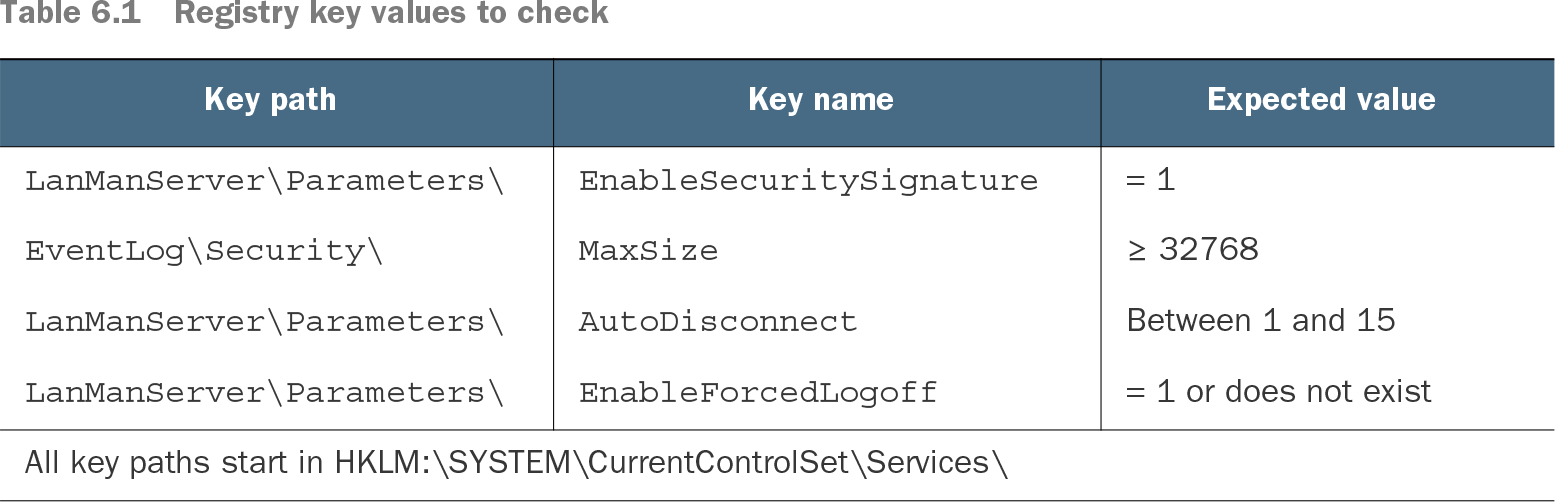
Table 6.1 Registry key values to check (view table figure)

Key path

Key name

Expected value

LanManServer\Parameters\

EnableSecuritySignature

= 1

EventLog\Security\

MaxSize

≥ 32768

LanManServer\Parameters\

AutoDisconnect

Between 1 and 15

LanManServer\Parameters\

EnableForcedLogoff

= 1 or does not exist

All key paths start in HKLM:\SYSTEM\CurrentControlSet\Services\

Use the registry-value table to compare key paths, names, expected values, and conditions before designing the data representation. section 6.2.1


How Practical Automation with PowerShell: Effective scripting from the console to the cloud covers it

How deep it goes
Defines fields, comparison operators, arrays, and nested tests, then extends the representation toward classes without detailing the complete function.
Examples
Uses registry security-baseline settings, four condition types, a comparison table, and a PowerShell hashtable with nested tests.
What it assumes
Assumes familiarity with PowerShell hashtables, comparison operators, and registry cmdlets while deriving the structure from stated conditions.
What you can do after
Build it from scratch by modeling registry requirements and supplying reusable functions with maintainable external data.
How it connects
Connects data structures with DRY, functions, modules, PowerShell classes, JSON serialization, and registry automation.

Also explained in

Compare how 10 books explain data structure →

Related concepts

This explainer was generated by Manning's knowledge graph from the text of Practical Automation with PowerShell: Effective scripting from the console to the cloud. The section links point to the parts of the book it draws on.