Data testing adds checks to a data pipeline to validate quality and identify violations before unreliable data reaches analytics consumers. It evaluates conditions such as integrity, completeness, consistency, valid types and ranges, missing values, uniqueness, and recency. section 14.0 section 14.1.1
Run tests synchronously as tasks following ingestion or transformation, or independently from ingestion on a schedule. Pipeline tasks provide immediate, step-specific checks; independent testing avoids adding delay and suits frequent or continuous ingestion such as Snowpipe. section 14.1 section 14.1.2
Choose a response that matches the severity and operational need:
- Stop execution for significant failures, such as no arriving data or corrupted data that cannot be inserted. section 14.1.1
- Notify designated recipients so they can correct source data and support a later ingestion run. section 14.1.1
- Log violations for later inspection; optionally log successful checks to demonstrate that testing occurred. section 14.6
Task-based checks and a violation log
After loading PARTNER_TBL and PRODUCT_TBL, add dependent quality tasks. A null PARTNER rating and a PRODUCT category of “Cake,” where allowed categories are “Bread” or “Pastry,” produce DQ_LOG entries with the task, rule, error count, and offending record identifier. Bundle multiple tests for one table when appropriate rather than creating a task per rule. section 14.2 section 14.2.3
For scheduled monitoring, assign Snowflake system or custom data metric functions to tables or views. Their results are stored in the account event table; Snowflake alerts can evaluate violations over a chosen interval and send email or perform another action. section 14.6
Figure 14.1 Tasks and their dependencies in the task graph from chapter 13. The pipeline starts with a root task named PIPELINE_START_TASK, executes the data ingestion and transformation steps in sequence, and ends with a finalizer task named PIPELINE_END_TASK. In this chapter, we will add the PARTNER_DQ_TASK and PRODUCT_DQ_TASK tasks that check data quality after ingesting data into the PARTNER_TBL and PRODUCT_TBL tables.
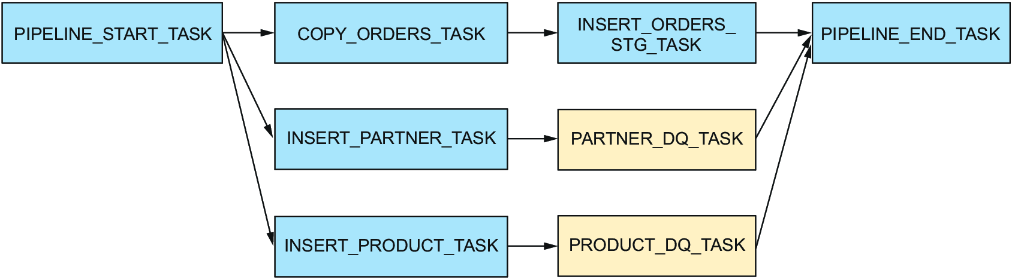
The task graph shows where quality tasks fit: immediately after their corresponding ingestion tasks and before the pipeline finalizer. section 14.2

