A data warehouse layer is the shared pipeline area where data from multiple sources is collected and modeled into one consistent model for business use. It follows extraction and staging, producing clean integrated data for downstream presentation or reporting consumers. Layers are logical rather than mandatory: a pipeline can omit this layer or add others when its needs differ. section 11.1.3 section 11.3
Figure 11.3 The most common data transformation layers in data pipelines are the extraction layer, the staging layer, the data warehouse layer, and the presentation layer.
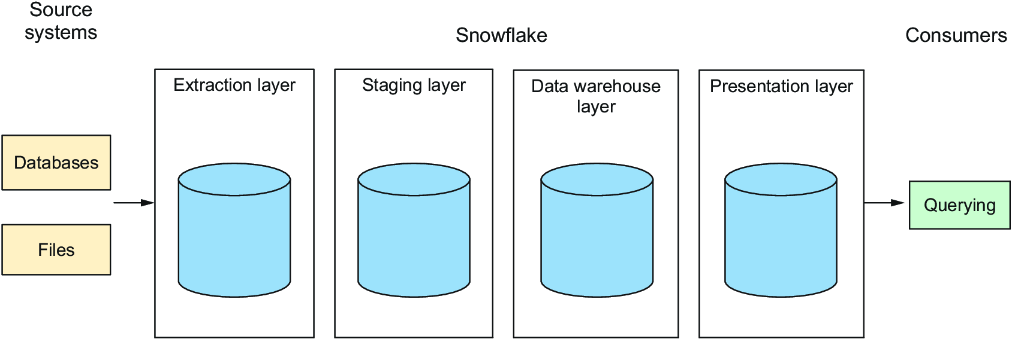
Use the layer flow to place the warehouse layer between preparation work and consumer-facing outputs, keeping transformations and dependencies visible. section 11.1.3
Keep data flows separated by layer instead of joining objects across layers. Pipeline outputs may be physical objects such as tables, materialized views, or dynamic tables, or virtual outputs saved as views. The warehouse layer can therefore be implemented in forms suited to the pipeline’s requirements while preserving a consistent boundary for integrated data. section 11.1.3 section 11.3
Organize the layer physically according to access and operational needs:
- Represent layers as schemas in one database when a shared database organization fits the pipeline. section 11.1.4
- Use separate databases for layers, or combine separate source-oriented extraction databases with schemas for later layers, when source separation is useful. section 11.1.4
- Plan authorization boundaries when choosing databases and schemas so consumers access only permitted objects. section 11.1.4
- Keep the warehouse layer as the point where data from all sources is combined; use staging as the intermediate consolidation step. section 11.1.4
Build the layer around a unified data model. Data requiring no further transformation can still be exposed through warehouse-layer views, rather than being consumed directly from staging. This preserves a consistent flow and makes all warehouse data available in one place. section 11.2.3
Integrating orders with normalized keys
Create PARTNER and PRODUCT views over staging tables when their columns can be used directly. Then create an ORDERS view that joins staged JSON orders to those entities by customer and product names, deriving PARTNER_ID and PRODUCT_ID. The resulting order data can later join by primary keys in a reporting layer. Unmatched names are a data-quality case that may require pipeline tests. section 11.2.3
A normalized warehouse model can contain ORDERS, PARTNER, and PRODUCT entities. In the order integration, descriptive source values such as a customer name or baked-good type are matched to entity names to obtain relational primary keys, allowing later reporting joins to use those keys instead of source labels. section 11.2.3
