A database server can host multiple databases. For a microservices application, that means one server can keep setup and maintenance simple while each microservice still owns a separate database. In a video application, the database holds metadata such as a video path; the video file itself can live in cloud file storage. section 4.5.2 section 4.0
Run MongoDB alongside a microservice
Add a `db` service using `mongo:7.0.0` to `docker-compose.yaml`, then run `docker compose up --build`. The mapping `4000:27017` exposes the server on host port 4000; other containers use port 27017. Set the microservice’s `DBHOST` to `mongodb://db:27017` and its `DBNAME` to the database it should use. The Node.js service connects with `mongodb.MongoClient.connect(DBHOST)`, selects `client.db(DBNAME)`, and accesses its `videos` collection. section 4.5.2
Listing 4.5 Adding a MongoDB database
version: '3'
services:

  db:                                      #1
    image: mongo:7.0.0                     #2
    container_name: db                     #3

    ports:
     - "4000:27017"                        #4
    restart: always                        #5

  azure-storage:
    image: azure-storage
    build:
      context: ./azure-storage
      dockerfile: Dockerfile
    container_name: video-storage
    ports:
     - "4001:80"
    environment:
      - PORT=80
      - STORAGE_ACCOUNT_NAME=${STORAGE_ACCOUNT_NAME}
      - STORAGE_ACCESS_KEY=${STORAGE_ACCESS_KEY}
    restart: "no"

  video-streaming:
    image: video-streaming
    build:
      context: ./video-streaming
      dockerfile: Dockerfile
    container_name: video-streaming
    ports:
     - "4002:3000"
    environment:
      - PORT=80
      - DBHOST=mongodb://db:27017          #6
      - DBNAME=video-streaming             #7
      - VIDEO_STORAGE_HOST=video-storage
      - VIDEO_STORAGE_PORT=80
    restart: "no"
The Compose listing shows the database service, its published image and port mapping, and the microservice connection setting. section 4.5.2
Keep the distinction between server and database when the application grows. Separate microservices should not share a database: shared data couples them and makes independent changes and scaling harder. They can still use the same server. If one database needs more compute, memory, or storage, move it to a dedicated server; MongoDB sharding is an option for an extremely large database. For production, keeping data outside a Kubernetes cluster lets the cluster be rebuilt without losing it. section 12.3.6 section 4.8
Figure 12.16 It’s completely okay to have separate databases running on a shared database server (this is often the simplest and cheapest way to get started).
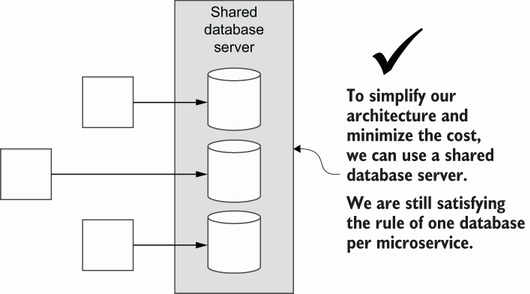
The diagram distinguishes separate microservice databases from the single server that hosts them. section 12.3.6
