A DataSource provides an application with connections to a database server. Instead of creating a connection for every operation, application logic asks the data source for one. This separates connection management from business logic and can avoid the cost of repeatedly establishing network connections. section 12.1
Figure 12.2 The data source is a component that manages connections to the database management systems (DBMS). The data source uses the JDBC driver to get the connections it manages. The data source aims to improve the app’s performance by allowing its logic to reuse connections to the DBMS and request new connections only when it needs them. The data source also makes sure to close the connections when it releases them.
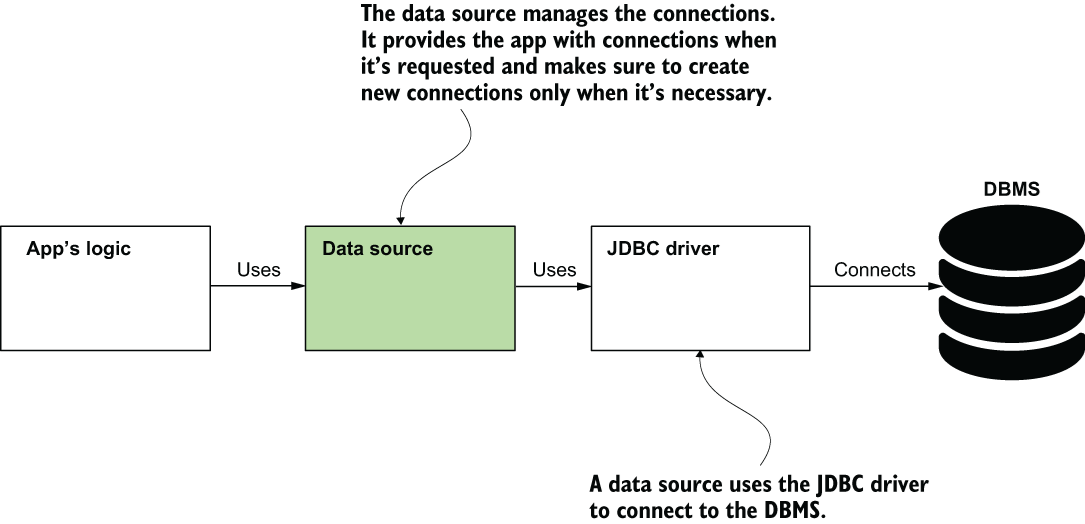
Follow how a data source obtains connections through a JDBC driver and manages their reuse and release. section 12.1
JDBC supplies Java abstractions for working with relational databases. The application also needs a JDBC driver for its particular database technology. A data source implementation can manage a pool of connections; Spring Boot’s default HikariCP implementation does so. section 12.1 section 12.5
In a Spring application, JdbcTemplate uses a data source to connect to the database and simplifies JDBC operations. For example, a repository can use JdbcTemplate to insert purchases and retrieve them without placing connection-management logic in the controller. section 12.2 section 12.5
Choose a configuration approach that fits the application:
- Use Spring Boot properties for a straightforward setup. Add the database’s JDBC driver and provide spring.datasource connection details; Spring Boot creates the DataSource bean. section 12.3 section 12.3.1
- Define a custom DataSource bean when you need control over its implementation or runtime settings, use multiple databases, or use Spring without Spring Boot. A declared DataSource bean replaces Spring Boot’s default. section 12.3.2 section 12.5
Listing 12.15 Defining a DataSource bean for your project
@Configuration
public class ProjectConfig {

  @Value("${custom.datasource.url}")         #A
  private String datasourceUrl;

  @Value("${custom.datasource.username}")    #A
  private String datasourceUsername;

  @Value("${custom.datasource.password}")    #A
  private String datasourcePassword;

  @Bean                                #B
  public DataSource dataSource() {        #C
    HikariDataSource dataSource =            #D
      new HikariDataSource();

    dataSource.setJdbcUrl(datasourceUrl);        #E
    dataSource.setUsername(datasourceUsername);  #E
    dataSource.setPassword(datasourcePassword);  #E
    dataSource.setConnectionTimeout(1000); #F

    return dataSource;
  }
}
This configuration creates a HikariDataSource bean, sets its connection details, and customizes its connection timeout. section 12.3.2
For multiple databases, create separate data sources and distinguish beans of the same type with qualifiers; each data source can have its own JdbcTemplate. Keep production passwords out of ordinary properties files and use a secret vault instead. section 12.5 section 12.3.1
