DBCC SHRINKFILE reduces a specified SQL Server database file when space can be released, but shrinking a data file can badly fragment its indexes. Treat it as a deliberate maintenance operation, not routine housekeeping. section 9.2
Mistake: shrinking after a purge without rebuilding indexes
In the MarketingArchive scenario, old rows are deleted, free space is measured with a 20% growth allowance, and the data file is reduced with DBCC SHRINKFILE ('MarketingArchive', 838) WITH WAIT_AT_LOW_PRIORITY. The file reaches its target, but indexes can approach 100% fragmentation, harming sequential scans and multi-page lookups. Measure fragmentation before and after, then rebuild affected indexes; rebuilding all indexes is shown as a possible follow-up. section 9.2
Apply these safeguards before and after shrinking:
- Purge obsolete data first, then calculate available space and retain approximately 20% for natural growth. section 9.2
- Use WAIT_AT_LOW_PRIORITY when a long-running query could block the schema lock; in SQL Server 2022, the shrink can time out after one minute. section 9.2
- Check index fragmentation afterward and rebuild indexes when the shrink has left pages out of order. section 9.2
- For fragmented transaction logs, back up the log in FULL recovery or truncate it in SIMPLE recovery before shrinking, then configure an appropriate growth increment. section 9.5
Listing 9.7 Shrinking the data file
DBCC SHRINKFILE ('MarketingArchive' , 838) WITH WAIT_AT_LOW_PRIORITY ;
GO
Inspect the concrete T-SQL command that shrinks the MarketingArchive data file to its calculated target. section 9.2
Figure 9.3 File shrink operation
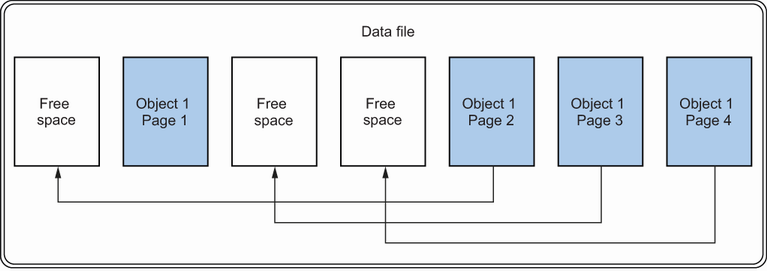
Use the file-shrink diagram to understand why moving pages during a shrink can produce fragmented indexes. section 9.2
