The Debug Toolbar controls a running debugging session in Visual Studio Code. After a breakpoint pauses execution, it lets you continue to another breakpoint, move through code, enter called functions, leave the current function, restart, or stop. section 8.2.2
Use the toolbar buttons to choose how execution advances:
- Continue (F5) runs until the next breakpoint or the end of the debugging session. section 8.2.2
- Step Over (F10) advances within the current function without tracing into called functions. section 8.2.2
- Step Into (F11) enters functions you have written and continues line by line inside them. section 8.2.2
- Step Out (Shift + F11) runs until the current function ends; restart and stop control the session itself. section 8.2.2
Tracing count_words
Set a breakpoint before count = 0 in count_words, start debugging, and inspect the highlighted current line. Use Step Over to follow the loop without entering word.lower(); use Step Into when you need to inspect a function call. Continue runs to the end when the breakpoint will not be reached again. section 8.2.2
Figure 8.5 The Debugging Toolbar
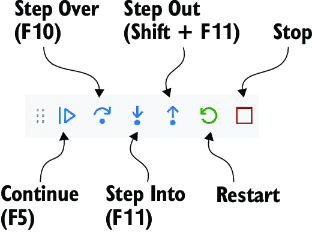
View the toolbar layout while matching each control to its execution behavior. section 8.2.2
