Mistake #1: treating T-SQL like a step-by-step program. A descriptive query states the result you want; SQL Server's Query Optimizer chooses how to produce it using indexes, statistics, metadata, and estimated costs. The optimizer often chooses well, but a poor plan can damage query performance. section 10.5 section 1.2.1
A join-performance trap
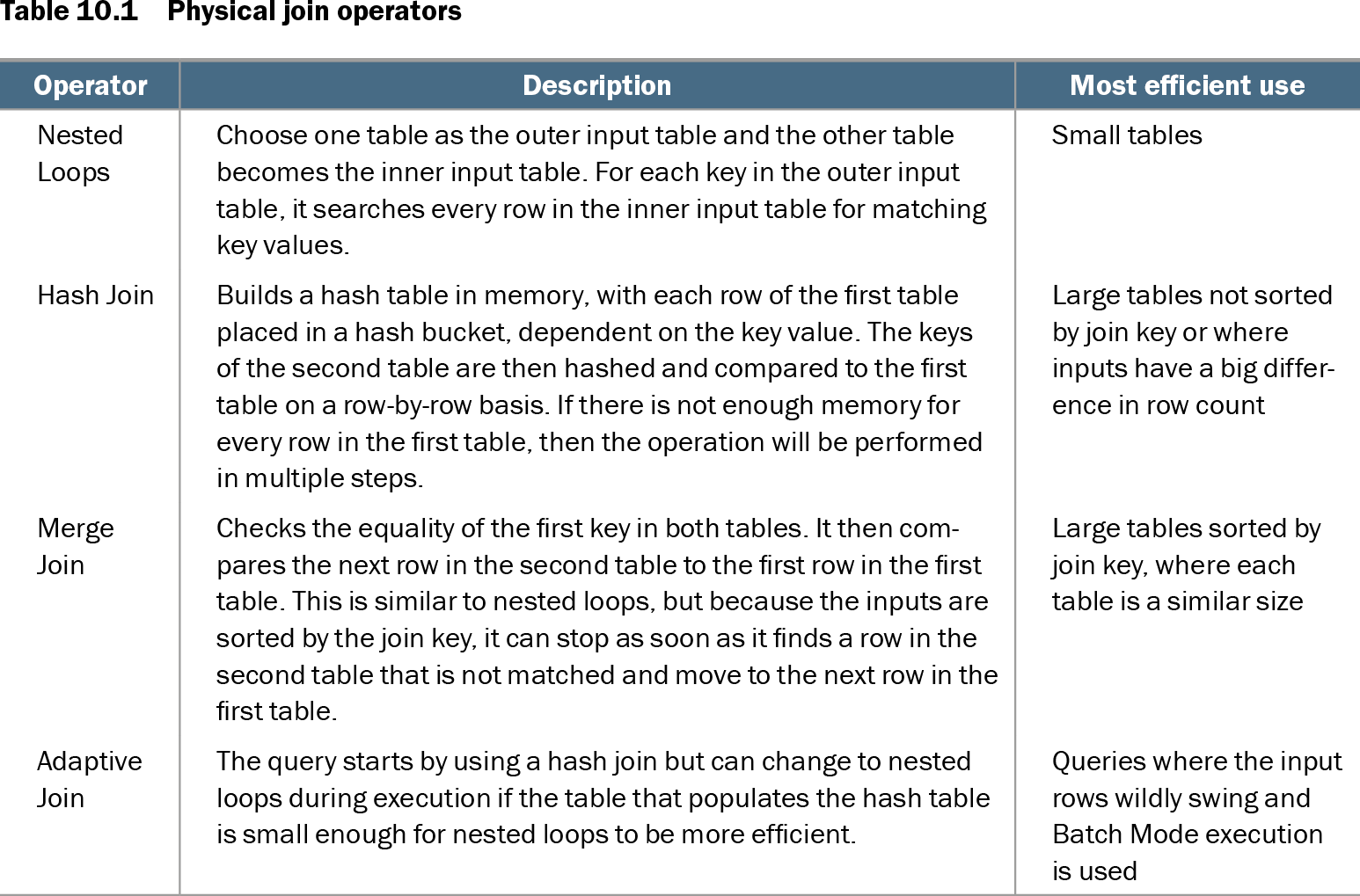
This query describes matching impression identifiers, not the physical steps for finding them: SELECT i.ImpressionUID FROM Marketing.marketing.Impressions i INNER JOIN MarketingArchive.dbo.ImpressionsArchive ia ON i.ImpressionUID = ia.ImpressionUID; If the optimizer selects Nested Loops and performance suffers, an INNER HASH JOIN hint can force a different operator. Treat that as an exceptional diagnostic measure, not the default fix; improving indexes on join columns may help the optimizer choose well without overprescribing the plan. section 10.5
Use descriptive SQL safely:
- Inspect the query plan before forcing an operator. section 10.5
- Maintain indexes and statistics so the optimizer has useful information. section 1.2.1
- Use query hints only for exceptional, understood performance problems. section 10.5
Table 10.1 Physical join operators (view table figure)
| Operator |
Description |
Most efficient use |
|---|---|---|
| Nested Loops |
Choose one table as the outer input table and the other table becomes the inner input table. For each key in the outer input table, it searches every row in the inner input table for matching key values. |
Small tables |
| Hash Join |
Builds a hash table in memory, with each row of the first table placed in a hash bucket, dependent on the key value. The keys of the second table are then hashed and compared to the first table on a row-by-row basis. If there is not enough memory for every row in the first table, then the operation will be performed in multiple steps. |
Large tables not sorted by join key or where inputs have a big difference in row count |
| Merge Join |
Checks the equality of the first key in both tables. It then compares the next row in the second table to the first row in the first table. This is similar to nested loops, but because the inputs are sorted by the join key, it can stop as soon as it finds a row in the second table that is not matched and move to the next row in the first table. |
Large tables sorted by join key, where each table is a similar size |
| Adaptive Join |
The query starts by using a hash join but can change to nested loops during execution if the table that populates the hash table is small enough for nested loops to be more efficient. |
Queries where the input rows wildly swing and Batch Mode execution is used |
Compare Nested Loops, Hash Join, and Merge Join with the table's guidance on when each physical operator is most efficient. section 10.5