liveBook · Manning

Developer portal

As explained in Microsoft Azure in Action

A developer portal is a web interface that provides API documentation, interactive endpoint testing, access credentials, and usage information for API consumers.

A developer portal is the public front door for an API: a generated website where developers learn how to use endpoints, get credentials, and try requests before wiring the API into their applications. section 8.4.3

A developer portal gives API consumers:

  • API documentation and endpoint examples. section 8.4.3
  • A way to sign up, obtain API keys, and view account usage statistics. section 8.4.3
  • Interactive endpoint testing, so developers can explore an API before connecting their own applications. section 8.4.3
  • Customizable branding, styling, content, and navigation rather than a permanently vanilla-looking website. section 8.4.3
Figure 8.26 The vanilla freshly created developer portal includes tools for updating the design and features, as well as testing it.
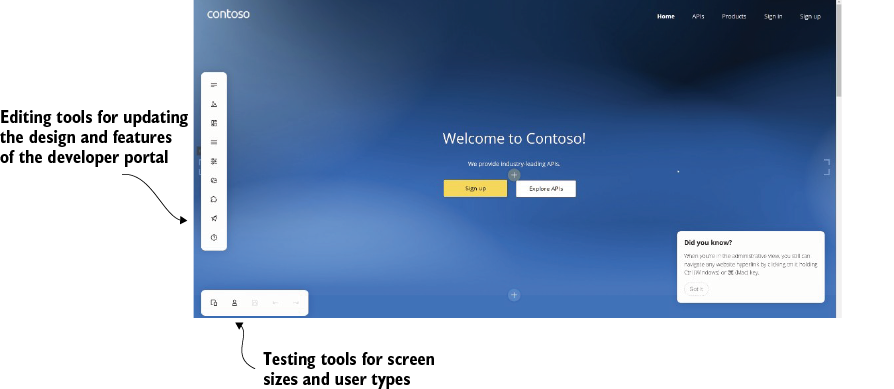
Inspect the freshly created portal to see its design controls, features, and endpoint-testing tools. section 8.4.3

Within Azure API Management, the portal is the main developer-facing surface, while the API gateway handles application connections and the management plane administers the service. Detailed portal configuration is left for later; exploring the generated site is the practical starting point. section 8.4 section 8.4.3


How Microsoft Azure in Action covers it

How deep it goes
Defines capabilities and customization options, but stops short of detailed portal design or configuration procedures.
Examples
Uses a freshly generated portal to demonstrate documentation, design controls, endpoint testing, sign-up, and API-key acquisition.
What it assumes
Assumes an API exposed through Azure API Management and teaches the portal’s purpose before detailed configuration.
What you can do after
Evaluate/understand how developers discover, test, authenticate to, and monitor an API through its public interface.
How it connects
Connects API documentation, API keys, endpoint testing, usage statistics, API gateway, and management plane.

Also explained in

Compare how 3 books explain developer portal →

Related concepts

This explainer was generated by Manning's knowledge graph from the text of Microsoft Azure in Action. The section links point to the parts of the book it draws on.
