DeveloperExceptionPageMiddleware helps you investigate unhandled exceptions while developing an ASP.NET Core application. When an exception propagates back through the middleware pipeline, it captures the exception and returns an HTML diagnostic page with HTTP status code 500. section 4.3.1
The page shows the stack trace, the source line where the exception occurred, and request details such as headers and cookies. Those details make debugging easier, but they can expose sensitive information. Never enable the developer exception page in production. section 4.3.1
Adding it to a pipeline
The explicit call is `app.UseDeveloperExceptionPage();`. Place error-handling middleware near the start of the pipeline so exceptions from later middleware can reach it. In a WebApplication running in the Development environment, the developer exception page is already added automatically, so the call is normally unnecessary. section 4.2.3 section 4.3.1
Figure 4.15 The developer exception page shows details about the exception when it occurs during the process of a request. The location in the code that caused the exception, the source code line itself, and the stack trace are all shown by default. You can also click the Query, Cookies, Headers, and Routing buttons to reveal further details about the request that caused the exception.
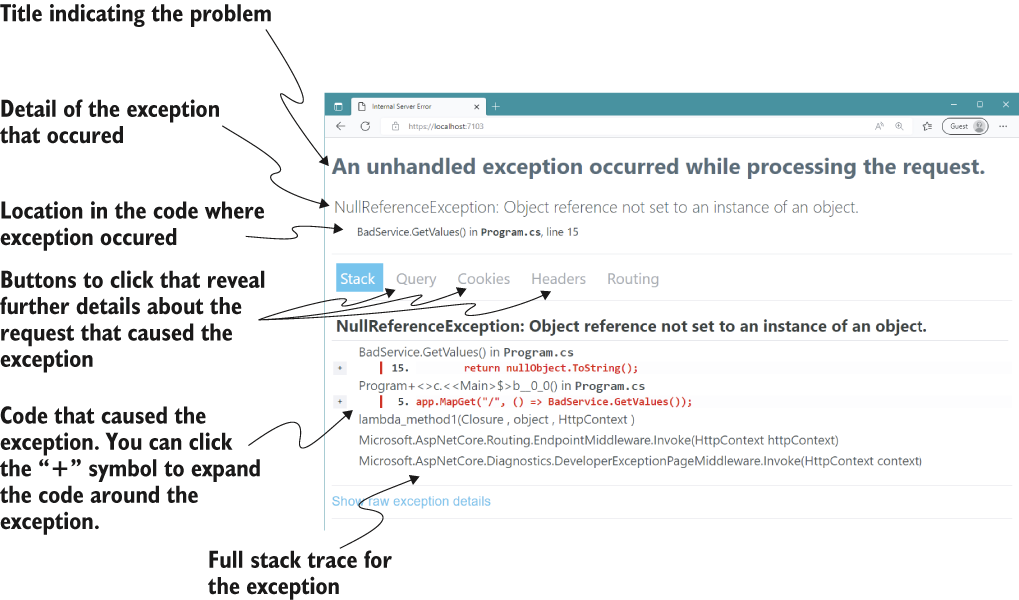
See where the page displays the failing source line and stack trace, and where to inspect query, cookie, header, and routing details. section 4.3.1
For production, use ExceptionHandlerMiddleware instead. It can return a custom error response without revealing the exception’s full details. A typical setup adds it only when `!app.Environment.IsDevelopment()`, using `app.UseExceptionHandler("/error")` and an `/error` endpoint to produce the response. section 4.3.2

