A development certificate secures HTTPS connections to an application during local development. ASP.NET Core templates use it automatically when no certificate is configured, allowing a browser to connect over HTTPS while you build and test. section 28.0 section 28.2
Expect this local-development behavior:
- The .NET SDK installs a development certificate the first time you run a dotnet command. section 28.2
- The certificate is not trusted by default, so browsers may display a security warning. section 28.2
- Trust the certificate instead of bypassing browser warnings. section 28.2
Trust the local certificate
Run `dotnet dev-certs https --trust` after installing the .NET SDK. Once trusted, locally served HTTPS pages should no longer show certificate warnings. section 28.2 section 28.5
Figure 28.4 The developer certificate is not trusted by default, so apps serving HTTPS traffic using it will be marked as insecure by browsers. Although you can bypass the warnings if necessary, you should instead update the certificate to be trusted.
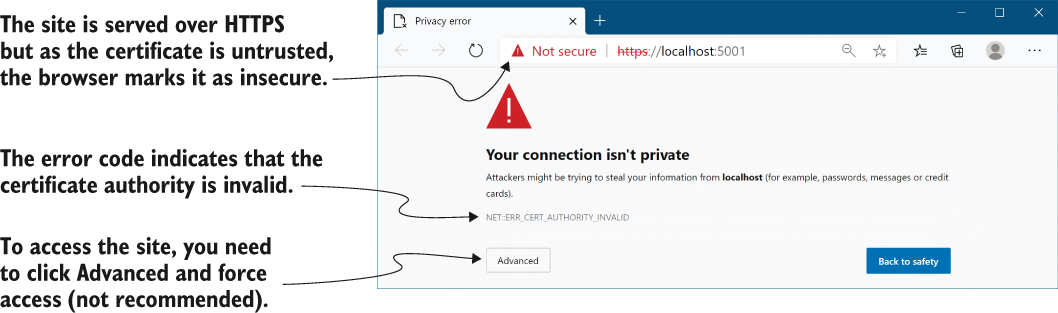
Use the browser-warning figure to distinguish an untrusted development certificate from a correctly trusted local certificate. section 28.2
The certificate is suitable for local testing only. Production deployments require a real production certificate, or HTTPS termination through a reverse proxy. section 28.0 section 28.5

