liveBook · Manning

Display block value

As explained in Tiny CSS Projects

The block display value makes an element participate in block layout and ordinarily occupy the available width of its containing block.

The block display value makes an element participate in block layout and ordinarily use the available width. In a narrow checkout table, applying it to rows and cells stacks each row vertically instead of preserving the usual table-row and table-cell structure. section 8.3.1

Stacking a table on narrow screens

Apply the value inside a media query: @media (max-width: 549px) { td, tr { display: block; } }. The rows and cells then form a vertical layout; images can float left while the remaining content wraps around them. section 8.3.1
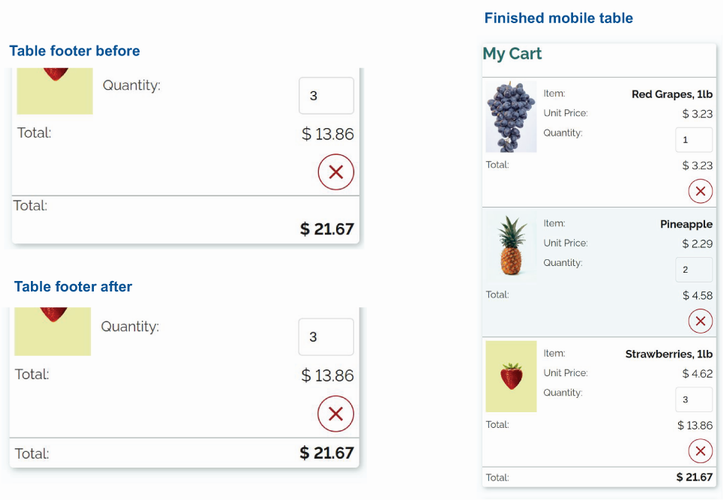
Figure 8.28 Table displayed as cards for narrow screens

Compare the finished narrow-screen table, where block-styled rows and cells help each row read like a card. section 8.3.1

How Tiny CSS Projects covers it

How deep it goes
Defines block versus table-row and table-cell behavior, then applies the change in a media-query listing without discussing broader layout internals.
Examples
Uses a mobile checkout table, block-styled rows and cells, and a card-like narrow-screen result.
What you can do after
Apply it via CSS media queries to stack table rows and cells vertically on narrow screens.
How it connects
Connects responsive design, media queries, table-row, table-cell, floats, and accessibility.

Related concepts

This explainer was generated by Manning's knowledge graph from the text of Tiny CSS Projects. The section links point to the parts of the book it draws on.