liveBook · Manning

Distributed storage

As explained in Learn Docker in a Month of Lunches, Second Edition

A distributed storage system stores and provides access to data across multiple networked storage resources.

Distributed storage provides data across networked storage resources. Containers can mount SMB or NFS shares, Azure Files, or Amazon S3 as filesystem locations, but applications may encounter unsupported operations and much slower network-based writes. section 6.4

Check two practical risks before using distributed storage for a container:

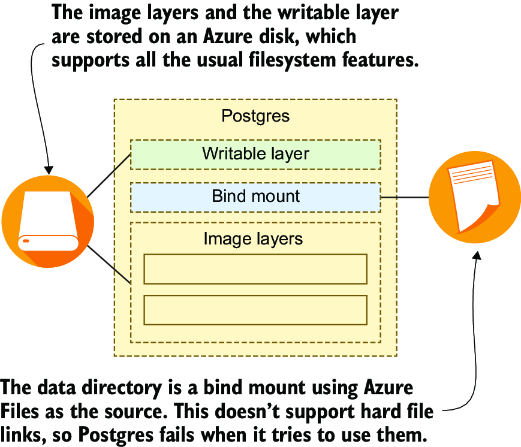
  • Verify that the storage supports every filesystem operation the application requires; Azure Files caused a Postgres container to crash when it attempted to create a file link. section 6.4
  • Expect different performance from local storage because file writes travel over the network; disk-intensive applications may become extremely slow. section 6.4
Figure 6.14 Distributed storage systems may not provide all the usual filesystem features.
figure

Use the figure to inspect how distributed storage can omit filesystem features expected by applications. section 6.4

How Learn Docker in a Month of Lunches, Second Edition covers it

How deep it goes
Explains mounts, unsupported filesystem operations, and network performance, but provides no setup exercise or implementation procedure.
Examples
Uses SMB, NFS, Azure Files, Amazon S3, and a Postgres file-link failure as examples.
What it assumes
Assumes familiarity with containers, bind mounts, and basic filesystem operations.
What you can do after
Diagnose filesystem compatibility and performance risks before mounting distributed storage into a container.
How it connects
Connects distributed storage with containers, bind mounts, filesystem operations, local storage, and databases.

Related concepts

This explainer was generated by Manning's knowledge graph from the text of Learn Docker in a Month of Lunches, Second Edition. The section links point to the parts of the book it draws on.