A distribution certificate identifies and authorizes software distributed for an Apple platform. Apple uses it to sign iOS and macOS apps; Visual Studio can automate requesting one, while multiple certificates and profiles can be managed through the Apple Developer website. section 12.4
In automated iOS builds, the certificate works with a provisioning profile. A workflow decodes the exported certificate, imports it into the macOS keychain, installs the profile, and passes both identities to the .NET MAUI publish command. section 12.2.3
A typical GitHub Actions setup handles the certificate as follows:
- Export the certificate and private key as a password-protected .p12 file, then Base64-encode it for storage as a repository secret. section 12.2.3
- Store the encoded certificate, its password, and its Keychain Access name in APPLE_CERT, APPLE_CERT_PASSWORD, and APPLE_CERT_NAME. section 12.2.3
- Decode the secret and import the .p12 file into the macOS login keychain with the security import command. section 12.2.3
- Build with /p:CodeSignKey set to the certificate name and /p:CodesignProvision set to the distribution profile name. section 12.2.3
Signing an iOS artifact
A .NET MAUI workflow can publish a Release iOS build for ios-arm64 with ArchiveOnBuild enabled, identify the distribution certificate through APPLE_CERT_NAME, select the distribution profile, and upload the resulting .ipa artifact. section 12.2.3
Figure 12.11 The iOS build and sign job is similar to the Android job but decodes (and installs) a distribution certificate instead of a keystore. It will also need to decode and import the provisioning profile.
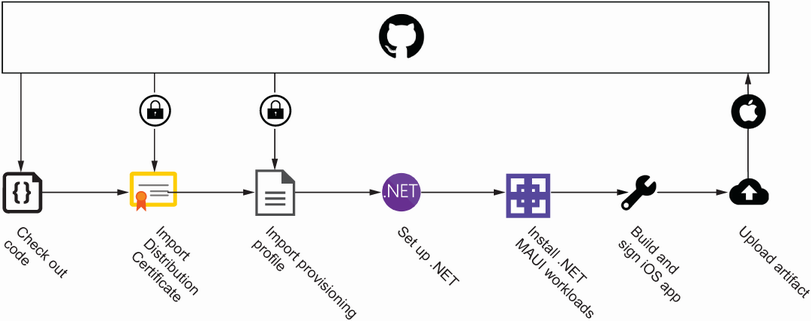
Use the workflow diagram to compare iOS signing with Android signing: iOS decodes and installs a distribution certificate and provisioning profile instead of using an Android keystore. section 12.2.3
