A Docker Swarm worker node is a virtual machine that runs tasks—Swarm’s name for running containers—assigned by a manager node. A worker cannot run without a manager, and tasks stay on their assigned nodes once defined. section 9.1
Worker nodes execute commands issued through the manager. A practical cluster uses one manager and two workers, with changes made on the manager rather than directly on the workers. section 9.1.1
Add a worker node to a Swarm cluster:
- Create a virtual machine in the same region as the manager, with a private IP address. section 9.1.3
- Install Docker Engine, then run the manager-provided docker swarm join command with its worker token and private address. section 9.1.3
- Repeat the process for each additional worker; successful output states that the node joined the swarm as a worker. section 9.1.3
A three-node application cluster
A manager coordinates two worker virtual machines. A Swarm stack defined with a Compose file deploys an NGINX load balancer, a Python web service, and a Node.js API service across the cluster. The workers run the container tasks while the manager controls deployment. section 9.1.1 section 9.1.3
Figure 9.2 Docker Swarm initialization output
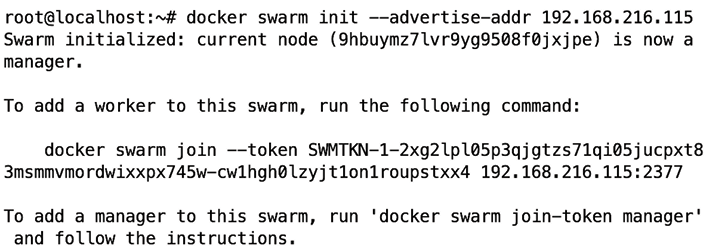
Inspect the Swarm initialization output to see the join command and token that enroll worker nodes. section 9.1.3
